
JobsiteBooked for window and door installers
Windows on order. The homeowner keeps calling.
JobsiteBooked is software for window installation businesses: homeowners check their install date in their own customer portal. When delivery slips, drag the install to a new day, and they get the new date by text.
- Free trial, no card
- We do the setup
- Month to month

- Install moved to the 14th 7:25 AM Patio door late, new date texted
- Measure photos: 14 openings 8:40 AM Checked in the office before the order
- Final invoice, deposit taken off 9:15 AM Pay-by-card link sent by text
Features for window and door installers
Measure, order, install, collect
Each tab shows the feature on a whole-house window job.
Land the job
Estimates
Pricing a whole house of windows eats an evening. Copy your last whole-house estimate, or start from a saved template, and change what differs.
- Three lines: vinyl, fiberglass and wood side by side
- Follow-ups: a text at 2 days, then a text and email at 5
- Kitchen table: signed on your tablet or laptop

Land the job
Online booking
Homeowners shop for windows in the evening. They book a measure on your website, or send photos of the old units first.
- Book a measure: picked from your open times
- Request form: preferred times, photos and the lead source
- Fixed prices: a screen repair or door adjustment booked online

Land the job
Review requests
The same lead went to several window companies, and they read reviews to choose. Your request goes a day after the job closes, so nobody's asked with a screen still on backorder.
- Your Google review link by email, the day after close
- Then a text: 3 days later
- Home dashboard: the count of your Google reviews

Land the job
Marketing
Homeowner work slows in a cold winter. Email the customers who did the front of the house an offer on the back.
- Email campaigns: a spring offer to everyone you've installed for
- Bulk text: one message to a tagged list, like past patio-door customers
- Lead sources: Google, a home show or a referral, on each request

Land the job
Website
Referrals look you up before they call. We build your website, with online booking for measures, as part of setup.
- Measures: booked on the site we build
- Website chat: answered from your phone, or by the AI front desk
- Built by us: during setup, as part of JobsiteBooked
Run the job
Scheduling
Ship dates move, so install days move. Signed jobs wait in the schedule-later list until the ship week comes in. Then you drag each onto a day.
- Whole-house jobs: a visit for each install day
- Crew of two or three: each installer sees the job
- Map: the day's measures in order, by straight-line distance

Run the job
Crew app
Installers call the office to ask which unit goes where. Each one opens the job on their phone, with the notes and the property's history.
- Checklist: foam, flashing tape, sill pan, trim
- Sign-off: the homeowner signs on the installer's phone
- Extra work: a rotted sill repair added as a line on site

Run the job
Job photos
Homeowners can't see the flashing once the trim is on. Send them the during and after photos in a photo report or a link.
- During: flashing and foam, shot before the trim goes on
- Photo report: a PDF, or a timeline link for the homeowner
- No signal: photos upload on their own later, on Android

Run the job
Time tracking
A two-day install runs into day three. Installers clock in and out of each visit on the crew page, and the visit note says why.
- Per visit: clock in and out from a phone's browser
- Visit note: rot behind the old frame, two hours lost
- Week's hours: edited, approved and downloaded as a payroll CSV

Run the job
Integrations
Install days live on a wall calendar in the office. Now they sync both ways with the office's Google Calendar, and installers see theirs in the crew app.
- Google Calendar: install days in the office's, two-way
- Gmail or Outlook: customer emails in your inbox, both ways
- Zapier: for the apps not on this list
Bill the job
Invoicing
Half the job is still owed when the crew packs up. Make the final invoice from the job, and it already shows the deposit taken off.
- Less the deposit: the balance worked out from the signed estimate
- Reminders: an email on the due date, then every 3 days, three times
- Builder statement: everything owed across their spec houses, on one page

Bill the job
Payments
A whole-house balance waits on a check that's in the mail. Homeowners pay it by card from a text, or log in and pay in their portal.
- Card link: the balance paid from a text or email
- Bank payment: US homeowners can pay a large balance from their bank
- Deposit: paid by card right after signing, before you place the order

Bill the job
Expenses
Foam, caulk, trim coil and the dump fee eat into a job's margin. Each receipt goes on its job from the office computer, with a photo.
- Receipt photo: kept with that install
- Haul-away: the dump fee counted against that install
- Job profit: each expense comes off that job's margin

Bill the job
QuickBooks sync
The office retypes every window invoice into QuickBooks. Sent invoices, payments and customers flow to QuickBooks Online, and customers added there come in too.
- Deposits too: the deposit payment goes over with the rest
- Your bookkeeper: works from QuickBooks as before
- At setup: you connect it once
Bill the job
Reporting
Ten installs this month, and some still owe the balance. Money owed lists every open balance and how long it has waited.
- Money owed: every balance left after install day, by age
- Job profit: each install's price less line costs, labor and expenses
- Sales tax: totals by rate for your filing

Bring them back
Texting & inbox
The same homeowner texts, emails and messages you on Facebook about one delivery. It all lands in one thread in your inbox, and you answer texts from your phone.
- Business number: calls ring the JobsiteBooked app on Android
- Missed call: a row on your phone with Call back and Request
- AI front desk: takes the call while you're setting a door

Bring them back
Reminders
The crew pulls up and nobody's home to open the door. A reminder text goes the afternoon before the install and an hour before.
- Day before: a text at 3:30 PM, then one an hour before
- On my way: the installer picks an ETA, and the homeowner gets it by text
- New date: a text whenever an install moves

Bring them back
Customer portal
Homeowners call to ask when the install is and how much they still owe. Their portal shows the install date, the balance and the files you shared.
- Upcoming visits, invoices and order papers under your logo
- Request work: a sticky door reported from their login
Bring them back
Customer list
A builder with three spec houses calls about the one on Birch. Each house sits under that builder, with its own notes and past visits.
- Pinned note: the order number and ship week, for whoever answers
- Property history: front windows in spring, an entry door in fall
- Tags: builder, retrofit, full-frame

Install season
Three places a window job slips
The wait on the order, the measure, and the call after a cold snap.
Week six on order
Their install date, in their own portal
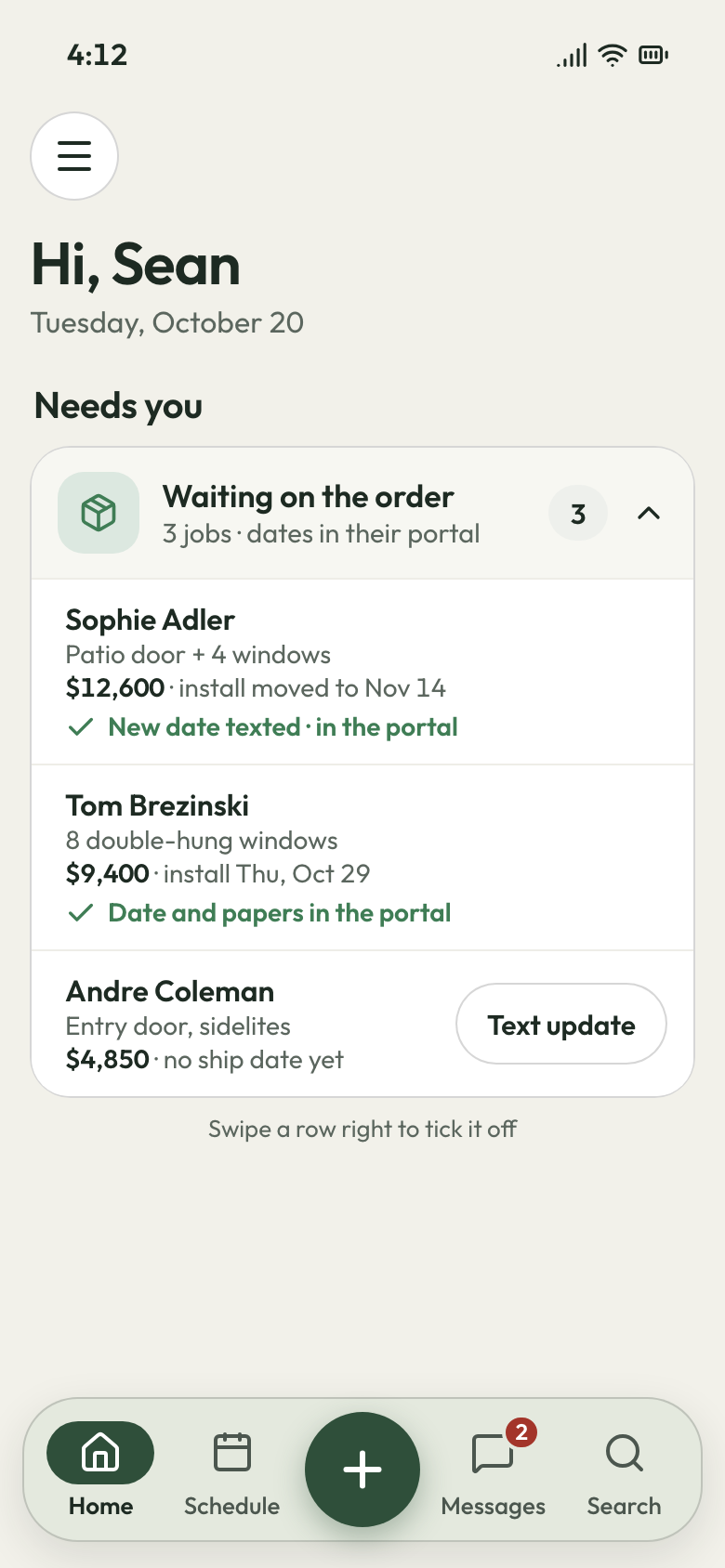
Six weeks after the deposit, the homeowner calls for the third time to ask about the install. You're up a ladder, and the order desk has no ship date. By the fourth call, they wonder where the deposit went.
The signed job waits in your schedule-later list until the order desk gives you a ship week. That week goes in the customer's pinned note, so anyone who answers can give it. Once set, the install shows under appointments in the homeowner's portal, beside the order papers you shared. If the ship week slips, drag the install to another day. The homeowner gets the new date by text.
- Customer portal: the install date and your order papers
- Date moved: the homeowner hears by text, not from a callback
- One text: everyone waiting on a late manufacturer, told at once
Install day, opening three
Each opening checked before you order
Install day, and the third opening is an inch off. The old unit goes back in, the reorder takes weeks, and the final payment waits for the second trip.
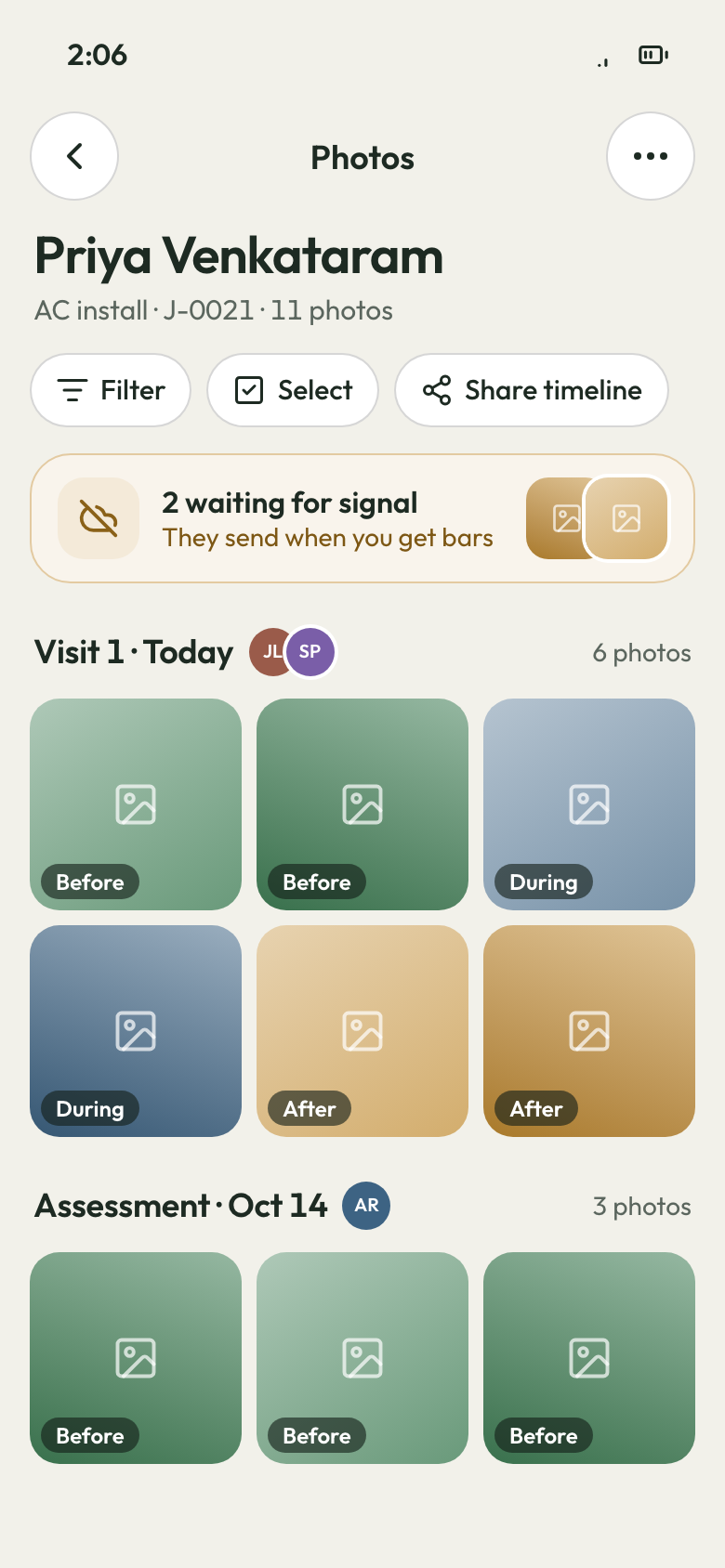
On the measure visit, the installer works down a measure checklist and photographs every opening on their phone. The photos land on the job, tagged Before. Back at the office, a second person checks every photo before you order. Rot or an out-of-square corner gets circled right on the photo. If a unit still comes in wrong, the measure visit shows what was checked and who was on it.
- Measure checklist: each opening worked through on site
- Before photos: every opening, tagged to the job
- Draw on a photo: mark the rot before the order goes in
First cold snap
Look at the leak before you drive out
The first cold snap, a patio door sticks and a sealed unit fogs. Both calls land on your cell while you're setting a door across town. One is a job a sub installed, and the homeowner still calls you.
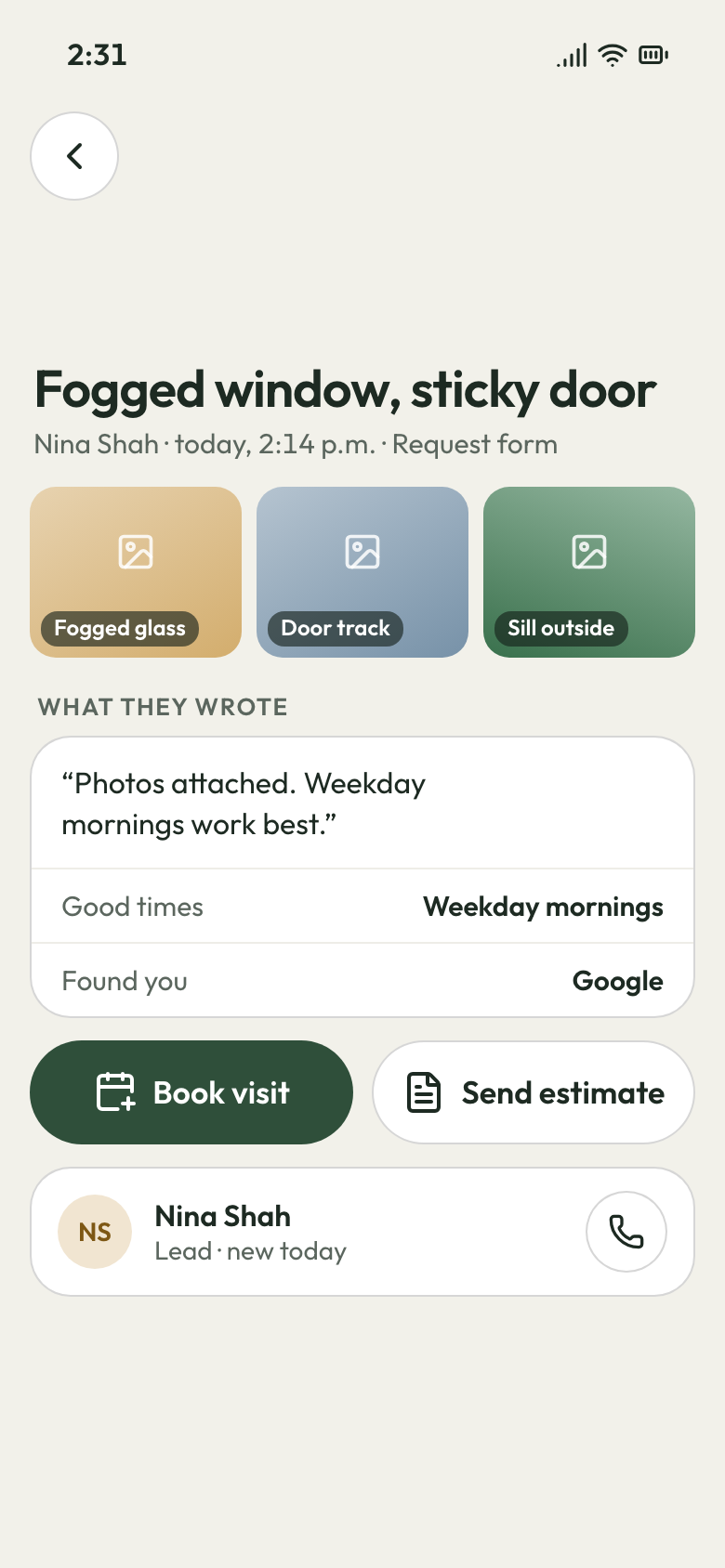
The homeowner sends a photo of the fogged glass through your website's request form. Or they ask for a visit from their portal. The job's history holds the during photos from install day, so you see how the flashing went in. When you can't pick up, the AI front desk answers, writes down the problem and books an assessment. Any call you miss shows on your phone with Call back and Request.
- Request form: a photo of the problem before the drive
- Job history: install-day photos of the flashing
- AI front desk: answers while you're up a ladder, then books the assessment


Winter is for booking spring's installs
Email past customers an offer on the windows they haven't replaced yet, while the crews are slow. We load your customer list at setup. Month to month, cancel any time.
What contractors say

Luis M.HVAC service Every seasontune-ups rebookedTune-up customers get put back on the schedule every season, and I don't lift a finger.

Carlos S.General contractor 40 → 150Google reviews in a yearWe went from 40 Google reviews to over 150 in a year, and nobody had to ask a customer by hand.

Mike D.Remodeling contractor Halfsigned before I'm homeI used to write estimates at the kitchen table at night. Now I send them from the truck, and half get signed before I'm home.

Dave P.Handyman Zeromissed callers left waitingIf my phone rings while I'm on a ladder, the caller gets a text from my business number before I climb down. Half the time they've picked a slot by then.

Tom R.Painting company 7 a.m.calls stoppedMy crew opens their phone and sees the whole day: addresses, notes, what to load. The 7 a.m. calls stopped.

Jake K.Flooring installer From a textinvoices paidCustomers pay the invoice from a text before we've finished loading the truck.


Why window and door installers switch
What a small window shop stops losing
The quote that went quiet
One estimate shows three window lines side by side, and follow-ups go at 2 and 5 days.
The balance held for a screen
The homeowner signs off on the installer's phone on install day. That evening, you text the final invoice, less the deposit.
The lead shared with four companies
Homeowners find you on the website we build and book a measure there. Every closed job asks them for a review.
What window installers ask us first
What software do window and door installers use?
How do I keep customers updated while their windows are on order?
How much deposit should I take on a window order?
Can my customer sign the window quote on their phone?
Does it work with QuickBooks, and is there an app for my installers?
How much does window installation software cost?
We do the setup
Next spring's installs, without the status calls.
We load your window and door lines and prices, your customers and your crew's phone links, then build your website. You keep measuring.
- Free trial, no card
- Month to month, cancel any time