
Bill the job
Jobs kept you busy. Which ones made money?
JobsiteBooked's job costing software for contractors sets each job's receipts, parts and crew hours against what you charged. You see every job's profit to the dollar before you bid the next one.
- Each job receipt saved with its photo and category
- Crew hours counted at your labor rate, visit by visit
- Profit and margin on every job, never shown to your techs
- Free trial, no card
- Month to month, cancel any time


Where it sits
Expenses sits in Bill the job
Land the job
Online booking · Estimates · Review requests · Marketing · Website
Run the job
Scheduling · Crew app · Job photos · Time tracking · Integrations
Bill the job
Invoicing · Payments · Expenses · QuickBooks sync · Reporting
Bring them back
Texting & inbox · Reminders · Customer portal · Customer list
Expenses
Costs that never make it onto the job
The underbid house, the parts used on site, and the bills for subs.
The next bid
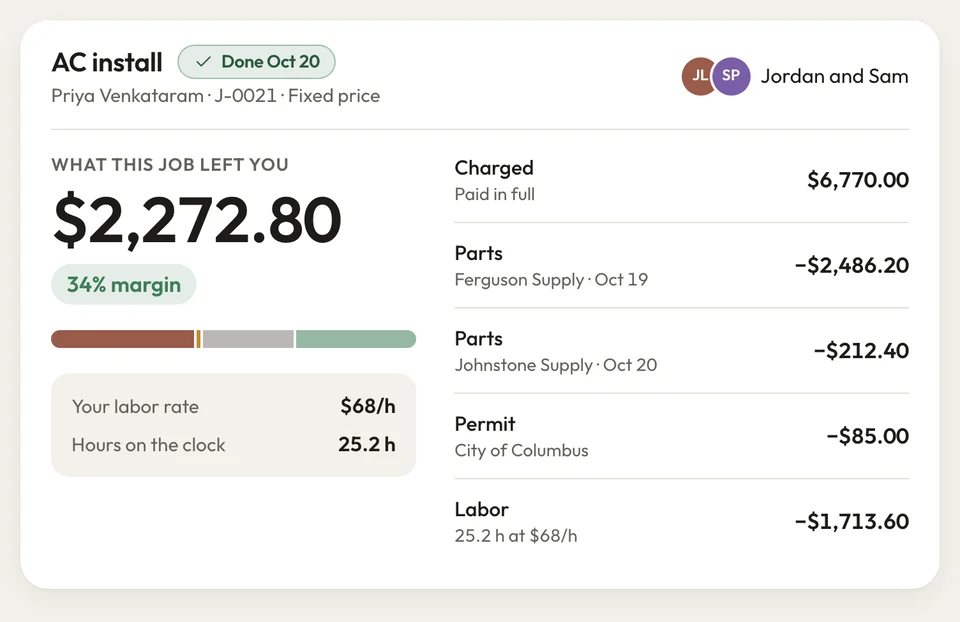
Know what each job left you
You priced the house at four days, and it took seven. You find out the job lost money at tax time, after you've bid three more like it.
At the office computer, each job receipt goes on its job with a photo, the amount and a category. Clocked crew hours count at your labor rate. The job shows what you charged, every cost, the profit and the margin.
- Profit: what you charged, less every cost
- Margin: shown on each job
- Labor: each visit's clocked hours at your rate
Parts on site
Parts used on site, costed on the job
The tech uses two fittings and a shutoff from the truck, and nobody writes them down. You paid for them, and neither the invoice nor the job shows it.
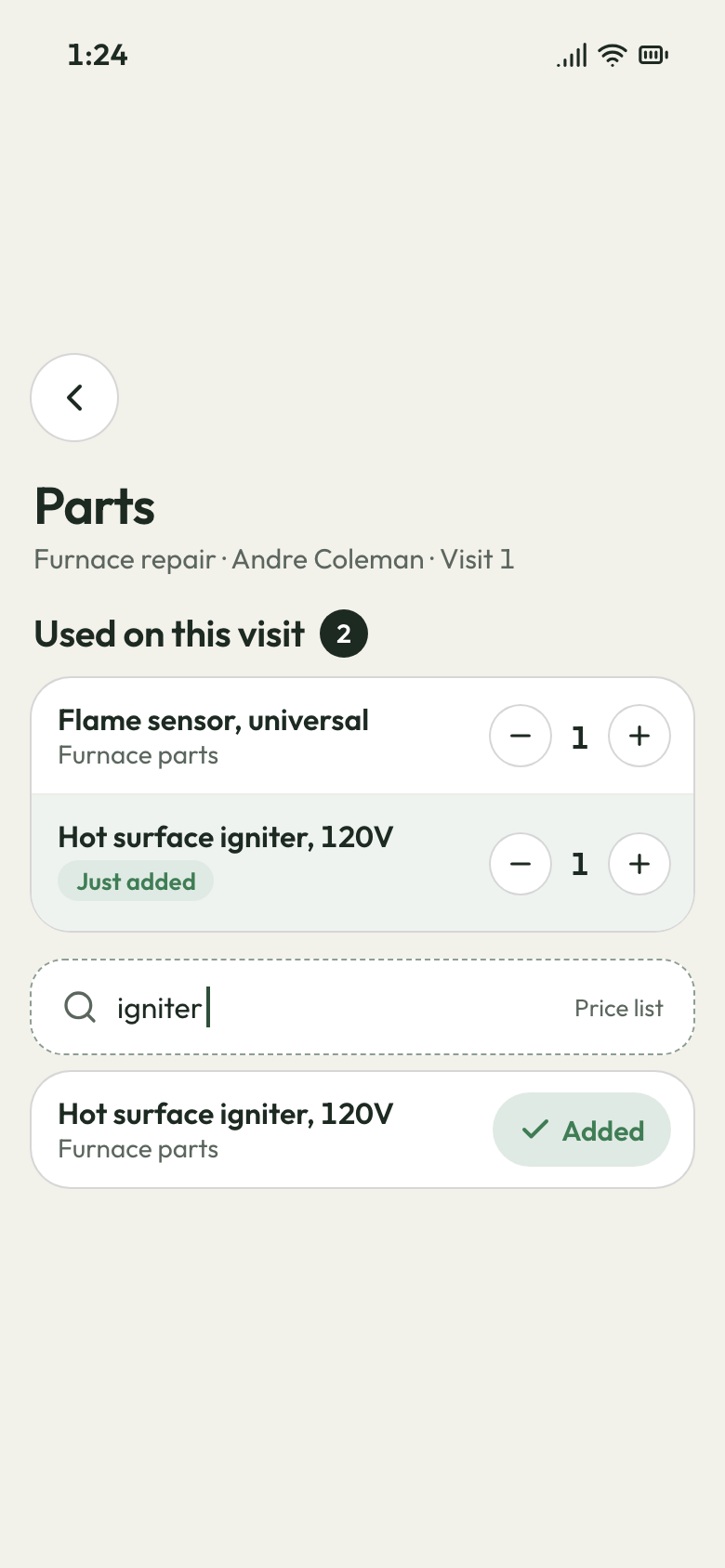
The tech adds each part on their phone from your price list, while still at the job. On a fixed-price job or one invoiced after each visit, it goes on the bill. The cost you set counts against the job's profit. Your techs never see that cost.
- Parts picked from your price list on the crew's phone
- On fixed-price and per-visit invoices, costed on the job
- Owner-only: cost and profit hidden from techs
Part added from the price list Subs and bills
Each sub's bill filed on its job
You paid the framer Monday and put the lumber on your card, but the homeowner pays next week. With three jobs open, you can't tell which one is carrying the others.
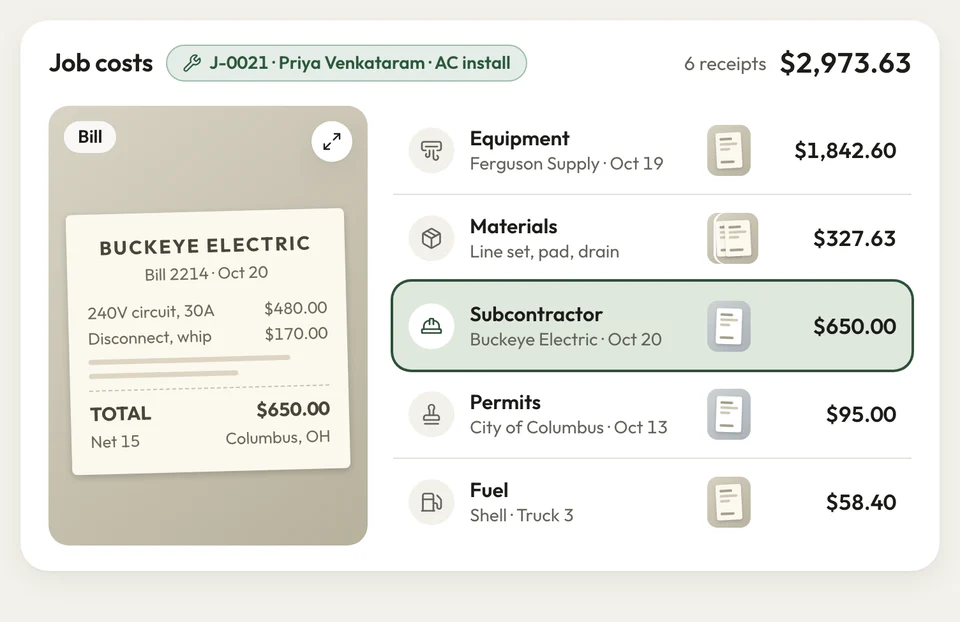
Enter each bill on its job from the office computer. The framer goes under Subcontractor, the lumber under Materials, the permit under Permits. Each open job's profit moves as the costs go in, so a thin job shows while it's still running.
- Six categories: materials, equipment, fuel, subcontractor, permits, other
- A receipt photo kept with each one
- Profit updated on every open job
Job costs by category


Composite decks kept my crew the busiest. Once receipts and hours went on each job, I saw they paid the least.
How it works
How the costs add up per job
Add receipts
Add each receipt to its job from the office computer, photo attached.
Count the work
Crew clock-ins and parts from your price list land on the same job.
Read the profit
Open the job for its profit and margin before you price the next one.
Related features
What feeds a job's numbers
- See Invoicing
Invoicing
What you invoice on the job is the revenue its costs come off.
- See Reporting
Reporting
Each job's margin, who owes you and for how long, and sales tax totals.
Reminders
Texts the day before and an hour before, so someone's home when the crew pulls up.
Next: Bring them backSee Reminders
Questions about job costs
What does job costing mean?
Can I log an expense against a specific job?
Can I attach a photo of the receipt?
Can I see my profit on each job?
Does my crew's time count in the job cost?

We do the setup
Bid the next job knowing what this one made
We do the setup: your services and prices, your customers, each crew member's personal link to the crew app, and your website. Your first job receipt can go on a job the day you start.
- Free trial, no card
- Month to month, cancel any time