
Bill the job
Who paid? Who's 60 days late?
JobsiteBooked's field service reporting software shows contractors who owes them, how late, and what each job made. You call the oldest balance first, and your accountant gets sales tax by rate.
- Unpaid balances sorted into 30, 60 and 90 days late
- Profit and margin on every job, crew hours and parts counted
- Sales tax by rate for the dates your accountant asks for
- Free trial, no card
- Month to month, cancel any time


Where it sits
Reporting sits in Bill the job
Land the job
Online booking · Estimates · Review requests · Marketing · Website
Run the job
Scheduling · Crew app · Job photos · Time tracking · Integrations
Bill the job
Invoicing · Payments · Expenses · QuickBooks sync · Reporting
Bring them back
Texting & inbox · Reminders · Customer portal · Customer list
Reporting
The answers used to live in your texts
Three questions owners ask every week, and the screen that answers each.
Who paid
Every balance, sorted by how late it is
Friday night you scroll Venmo and your texts to work out which of 60 accounts paid. The three who didn't get another text, and the evening is gone.
Payments due lists every overdue invoice with its days late, worst first. A second report splits each customer's balance by age, from current to over 90 days. You call the oldest one first.
- Balances by days past due
- Each customer's balance, totalled
- Payments coming due, listed
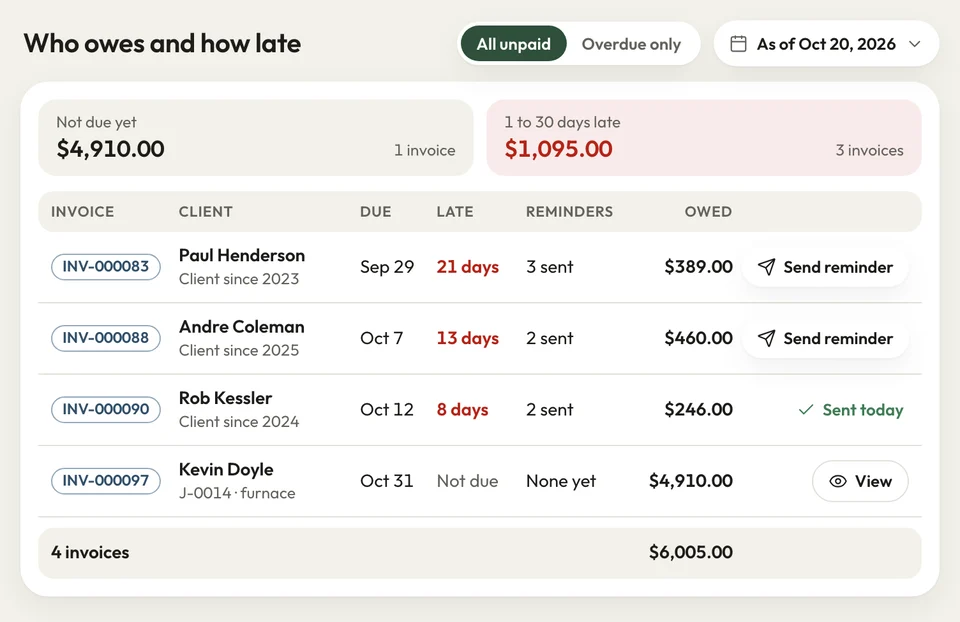
Balances by days past due Between jobs
The loose ends, waiting on your phone
Noon in the truck, you try to remember what's hanging. A quiet estimate, an uninvoiced job, a missed call: each one is money left sitting.
Open the Android app and Home is on your phone. Needs you lists new requests, quotes to follow up, finished jobs with no invoice, overdue invoices and missed calls. Today's visits and what you're owed sit below.
- Needs you: quiet estimates, uninvoiced jobs, missed calls
- Today's visits, in order
- Money owed: for the owner's eyes only
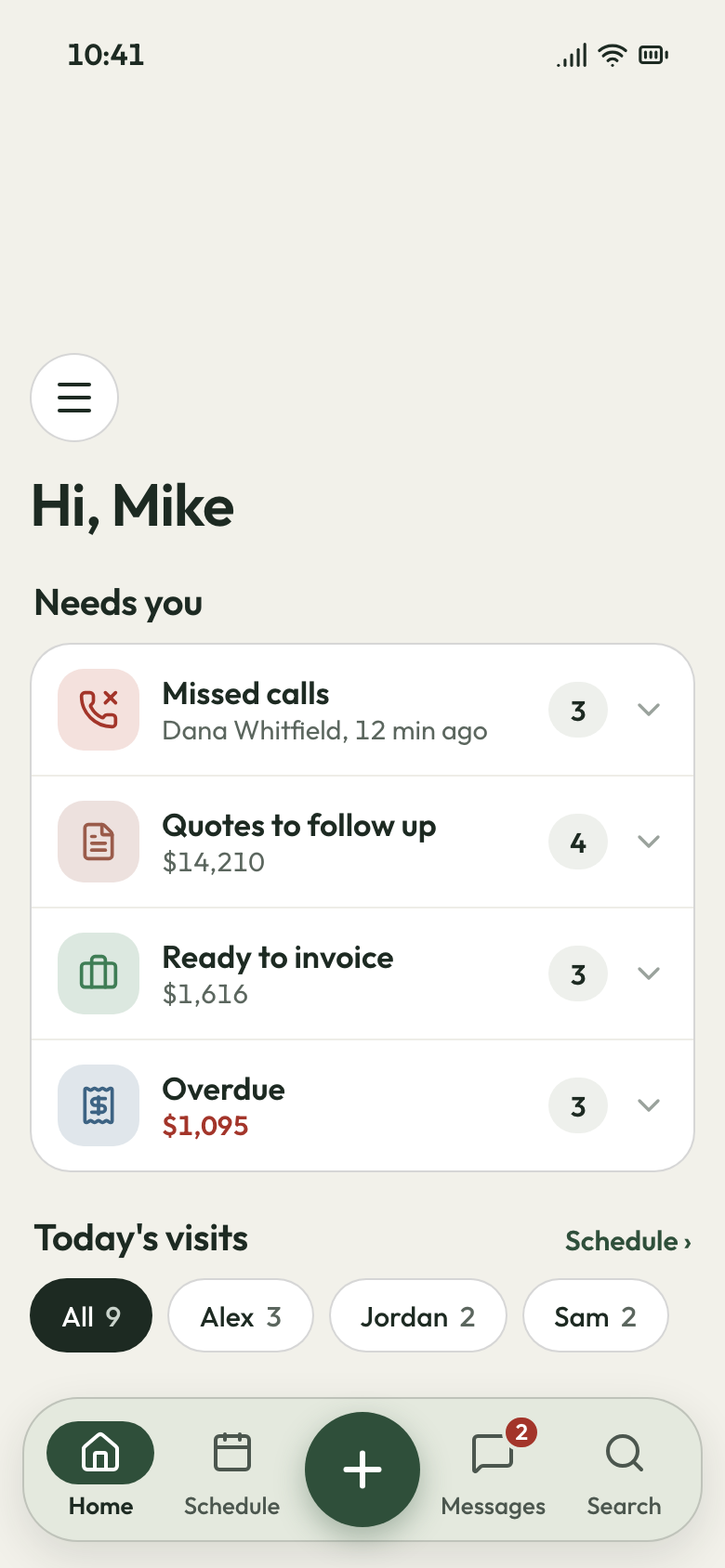
Home on the owner's phone Lumber's up
The jobs under your margin show up
First fence of the season, and lumber has gone up since last fall's bids. You built it at the old price and can't say if it cleared 30%.
Each job's money section sets what you charged against what it cost. That means parts from your price list, the crew's clocked hours at your labor rate and every receipt. A line with no cost gets flagged, so a job never looks better than it was.
- Revenue, line costs, labor and expenses per job
- Profit and margin on every job
- Lines missing a cost, flagged on the job
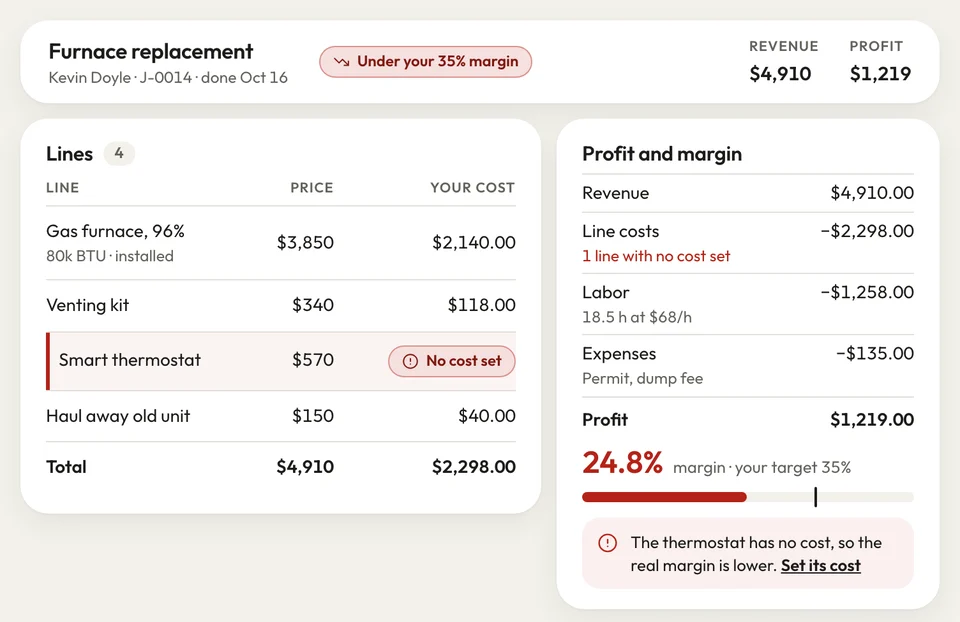
A job's profit and margin


Fall cleanings used to leave me a pile of balances I'd lose track of. Now I see who's past 60 days and call them before they hit 90.
How it works
Where the reports get their numbers
Work the job
Your crew times each visit and picks parts from your price list. You add the job's receipts.
Open Reports
Pick the dates and see payments due, balances by days late and sales tax by rate.
Call the late ones
Start with the over-90 column, then send your accountant the sales tax figures.
Related features
What feeds the reports
- See Invoicing
Invoicing
Invoices paid by card from a text come off what's owed; late ones get email reminders.
- See Expenses
Expenses
Job receipts with a photo, entered at the office, counted in that job's profit.
Customer list
Every customer's jobs, notes and lead source, open before you call about a balance.
Next: Bring them backSee Customer list
Questions about reports and money owed
What reports does JobsiteBooked have?
Can I see who owes me money and for how long?
Can I see whether a job made money?
Is there a reporting dashboard for the owner?
Can I pull sales tax for my accountant?
Can I see which lead sources send me work?

We do the setup
Know who's late before Monday's first call
We do the setup: your services and prices, your customers, each crew member's personal link to the crew app, and your website. Send your next invoice, and it comes off what's owed the moment it's paid.
- Free trial, no card
- Month to month, cancel any time