
JobsiteBooked for landscapers
Every lawn mowed. Now the chasing starts.
JobsiteBooked is software for landscaping businesses that shows who's paid for the month and who hasn't, without scrolling Venmo. Each mowing account's monthly invoice is drafted in one batch, and customers pay by card from a text.
- Free trial, no card
- We do the setup
- Month to month

- September mowing: 58 of 62 paid 6:45 AM The last 4 got their overdue reminder
- Rain day moved to Friday 7:20 AM Thursday's lawns, each customer texted
- Paver patio approved 8:10 AM Signed after the day-5 follow-up
Features for landscapers
The route, the cleanups and the installs
Each tab shows it on a weekly mow, a spring cleanup or a patio.
Land the job
Estimates
Patio and cleanup quotes go quiet after the walk-through. Yours carry up to three options, and follow-ups go at 2 days and 5.
- Options: mulch only, mulch and edging, or the full bed refresh
- Opened: you know who looked at the price
- Templates: the tenth mulch quote of the week starts from a saved one

Land the job
Online booking
Walk-throughs for yards that were never worth the drive. The request form asks for yard photos first, and the customer books the visit time.
- Yard photos: in hand before you drive across town
- Set-price services: a one-time cleanup or aeration booked online
- Pick a time: the customer books from the times you leave open

Land the job
Review requests
Weekly lawn customers seldom write a review unprompted. Close a cleanup or an install, and the customer gets your Google link the next day.
- Next day: your review link by email, a day after you close it
- Three days on: a short text with the same link
- Home screen: your Google review count as it grows

Land the job
Marketing
Spring cleanups book late, then all in one week. Text and email every past customer a cleanup and mulch offer in February.
- Bulk text: one message to every account on last year's route
- August email: aeration and overseeding before the fall rush
- Lead sources: door hangers, Google or Nextdoor, marked on each request

Land the job
Website
New customers look you up after dinner. We build your website at setup, with booking and the yard-photo request form on it.
- Chat bubble: answered from your phone between lawns
- AI front desk: takes the chat while you're on the mower
- Booking: a site visit picked from the times you leave open
Run the job
Scheduling
A rain day knocks the whole route back. Drag each visit to the day it fits, and the map lays out the new order.
- Recurring visits: weekly or every other week, set once per account
- Map: each crew's lawns in closest-first order
- Schedule later: one-off jobs parked until a day opens up

Run the job
Crew app
The crew lead calls about the gate code and the dog. Each crew sees today's lawns in order, with notes and directions.
- Checklist: mow, trim, edge, blow, gate latched
- On my way: one tap texts the customer an arrival time
- Property notes: the soft spot by the septic, the side gate

Run the job
Job photos
A customer says the back yard wasn't cut. The crew's after photo sits on that visit, and you send it as a link.
- Dead zones: on Android, photos upload once there's signal
- Before and after: a spring cleanup's beds, tagged to the visit
- Photo report: a finished patio as a PDF for the customer

Run the job
Time tracking
One lawn always runs long, and it's priced like the rest. Your crew taps in and out at each property, so the slow lawns stand out.
- Per visit: minutes on site at every property
- Job profit: a patio's install hours at your labor rate
- Visit notes: overgrown after the rain, cut twice

Run the job
Integrations
The crew lead asks what's on tomorrow. The crew page shows tomorrow's stops, and your Google Calendar syncs both ways.
- Google Calendar: every booked visit in the office's, both ways
- Gmail or Outlook: commercial accounts' emails in your inbox
- Zapier: connect the other apps you already use
Bill the job
Invoicing
Sixty mowing invoices typed one by one on the 1st. Bill each account per cut or by the month, and draft them all in one batch.
- Per cut or monthly: set the way each account pays
- Per-visit billing: a cleanup's invoice drafted when the crew marks it done
- Late fee: set once, then added to every overdue mowing invoice

Bill the job
Payments
Checks under the doormat and Venmo with no note. Customers pay by card from the invoice text or their portal, so each payment lands on its invoice.
- Card link: on every mowing invoice, by text and email
- Bank pay: for US customers who'd rather skip the card
- Deposits: the patio estimate signed, then the deposit paid by card

Bill the job
Expenses
Pavers, base stone and dump fees bought on the way to the job. Each receipt goes on that install from the office computer, with its photo.
- Receipt photo: the stone yard ticket kept with the patio
- Dump fees: counted against the cleanup that made them
- Job profit: materials set against what you charged

Bill the job
QuickBooks sync
Your bookkeeper retypes every mowing invoice. Sent invoices, payments and customers go over to QuickBooks Online instead.
- Monthly batch: the whole route's invoices, already in QuickBooks
- Payments: each card payment recorded there too
- Customers: ones already in QuickBooks come over too
Bill the job
Reporting
End of season, and no idea which jobs paid their way. Job profit shows what each one left, and Money owed lists every late account by age.
- Money owed: each account's balance and how late
- Job profit: a patio's price minus stone, crew hours and the skid steer rental
- Sales tax: collected on mulch and installs, split by rate

Bring them back
Texting & inbox
The phone buzzes in your pocket on the mower. Business calls ring the Android app, and texts, Facebook and website chat share one inbox.
- Missed call: a row with Call back, Request and a one-tap text
- AI front desk: picks up while you mow and books the site visit
- Instagram too: messages answered from the same phone

Bring them back
Reminders
Customers text to ask if you're coming this week. A text goes the afternoon before each visit, and another an hour ahead.
- 3:30 PM the day before: the crew is coming tomorrow
- Rain day: the new day by text when you drag a visit
- Site visits: a confirmation and a reminder before you walk the yard

Bring them back
Customer portal
Customers text to ask what they owe for the season. They log in to see every invoice, pay it, or ask for a fall cleanup.
- Every mowing invoice and payment, under your name and logo
- Request work: aeration or a fall cleanup asked for from their login
Bring them back
Customer list
A property manager has five townhomes on your route. Each address keeps its own visits, gate code and notes under that one customer.
- Pinned note: dog in the yard, latch the back gate
- Tags: weekly, every other week or cleanup-only
- History: every visit and photo at each address

Mowing season
Three places a lawn business leaks money
The 1st of the month, the rain day and the quiet quote.
The 1st of the month
Every account billed, every balance on one screen
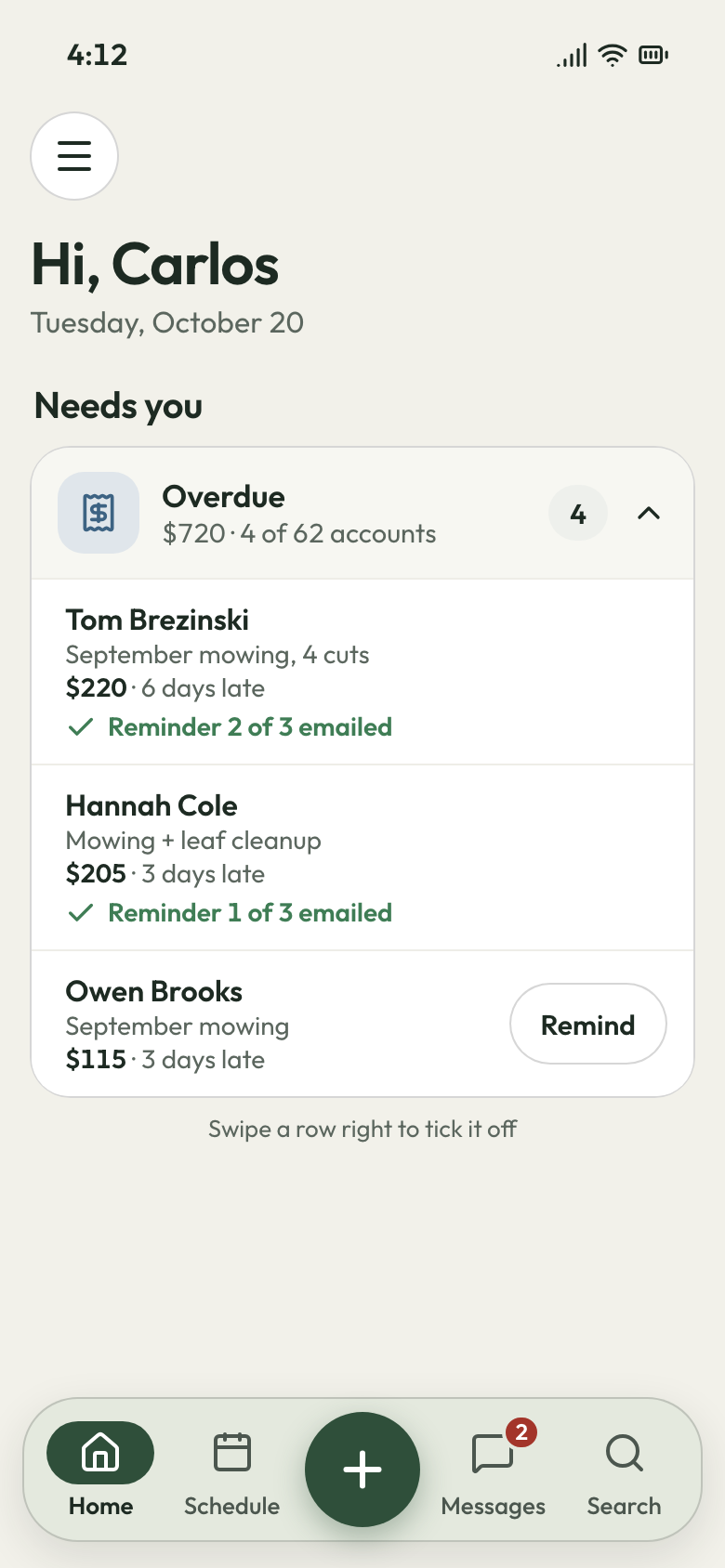
Sixty accounts, and you're scrolling Venmo and old texts to see who paid for September. The same three get another text from you, again.
Draft the whole route's monthly invoices in one batch, then send each with a pay-by-card link. A card payment marks its invoice paid, so Money owed lists only who hasn't, and how many days late. Past-due invoices get a reminder by email every 3 days, three times. On a patio job, the customer signs, then pays the deposit by card. The final invoice takes it off.
- Monthly batch: the whole route invoiced at once
- Money owed: who's late, and by how many days
- Overdue emails: every 3 days, three times
The rain day
Rained-out lawns moved, and every customer told
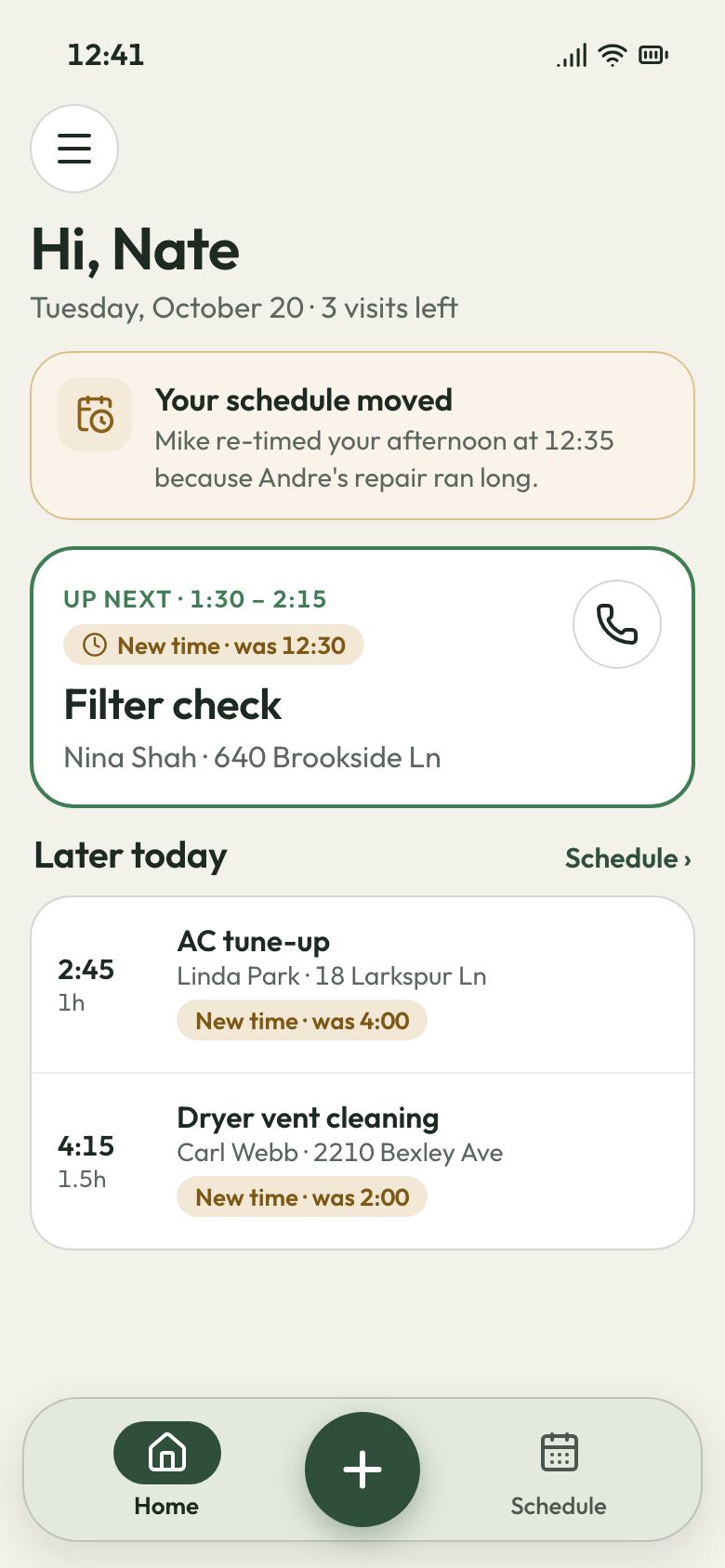
It rains Tuesday and Wednesday, and Thursday now holds three days of lawns. Customers text to ask if you're coming, and one finds the back yard uncut with no word why.
Drag the rained-out visits to the next days, and each customer gets a text with the new day. The map sets each crew's catch-up day in closest-first order, and one-off jobs wait in the schedule-later list. A locked gate means the crew marks the visit incomplete, with a note and a photo. The customer hears why from you before they notice the grass.
- Drag to move: rained-out visits onto the next dry day
- Rescheduled text: the new day, sent when you move it
- Mark incomplete: a note and a photo say why a yard was skipped
After the walk-through
Follow-ups go out while you're mowing
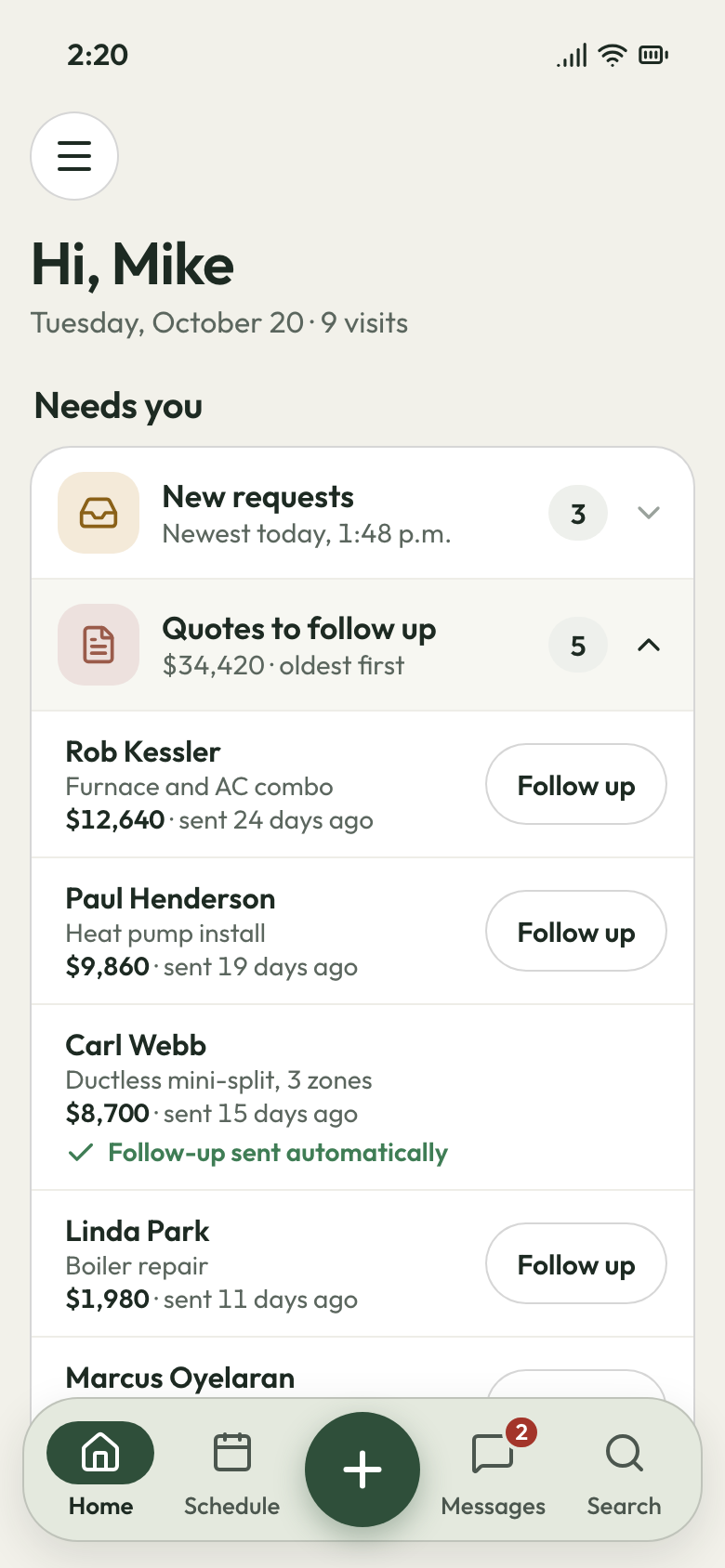
In April you walk a patio after dinner, type the quote at 10 PM, and send it Friday. Then nothing, and you mean to follow up but forget.
Yard photos come with each request, so you skip the drives that were never worth it. At the desk, copy last week's patio estimate, change the size, and offer a seat wall as an add-on. The customer picks on their phone, signs, then pays the deposit by card from the estimate. If they go quiet, a text goes at 2 days, then a text and email at 5. You also see who opened the quote and who never did.
- Follow-ups: a text at day 2, a text and email at day 5
- Copy an estimate: the next patio starts from the last one
- Options and add-ons: sizes side by side, a seat wall extra


Send October's mowing bills in one sitting
Set each account to bill per cut or by the month, once. We load your accounts and prices, and it's month to month.
What contractors say

Luis M.HVAC service Every seasontune-ups rebookedTune-up customers get put back on the schedule every season, and I don't lift a finger.

Carlos S.General contractor 40 → 150Google reviews in a yearWe went from 40 Google reviews to over 150 in a year, and nobody had to ask a customer by hand.

Mike D.Remodeling contractor Halfsigned before I'm homeI used to write estimates at the kitchen table at night. Now I send them from the truck, and half get signed before I'm home.

Dave P.Handyman Zeromissed callers left waitingIf my phone rings while I'm on a ladder, the caller gets a text from my business number before I climb down. Half the time they've picked a slot by then.

Tom R.Painting company 7 a.m.calls stoppedMy crew opens their phone and sees the whole day: addresses, notes, what to load. The 7 a.m. calls stopped.

Jake K.Flooring installer From a textinvoices paidCustomers pay the invoice from a text before we've finished loading the truck.


Why landscapers switch
Three costs a lawn crew stops eating
The drive to a yard not worth quoting
The customer sends photos of the beds and lawn with the request, before you load the trailer.
The call you missed on the mower
The AI front desk answers, takes the address and the job, and books a site visit on your calendar.
The refund for a skipped week
A moved visit texts the customer the new day. A skipped yard is marked with a note and a photo you can send.
Questions from lawn and landscape owners
Which lawn care software suits a two-truck crew?
How do I chase customers who haven't paid?
Can it handle recurring mowing, one-off projects and rain days?
Does it work on my phone, and can my crew use it?
Will my lawn care invoices go into QuickBooks?
What's the monthly cost of lawn care software?
We do the setup
Your accounts loaded before the first cut.
Send us your account list and prices. We load them, set up your crew's phone links and build your website while you keep cutting.
- Free trial, no card
- Month to month, cancel any time