
Bill the job
Job done three weeks ago. Still unpaid.
With JobsiteBooked's invoicing software for contractors, you text and email each invoice with a link to pay by card. Overdue customers get an email reminder every 3 days, three times, so you stop asking for the money.
- Customers pay by card from the invoice's text or email
- Billed after each visit: the invoice drafted when the crew marks it complete
- A month of maintenance accounts invoiced in one batch
- Free trial, no card
- Month to month, cancel any time


Where it sits
Invoicing sits in Bill the job
Land the job
Online booking · Estimates · Review requests · Marketing · Website
Run the job
Scheduling · Crew app · Job photos · Time tracking · Integrations
Bill the job
Invoicing · Payments · Expenses · QuickBooks sync · Reporting
Bring them back
Texting & inbox · Reminders · Customer portal · Customer list
Invoicing
Where the money stalls once the work is done
The slow payer, the bedtime invoice, and the month-end pile.
Overdue
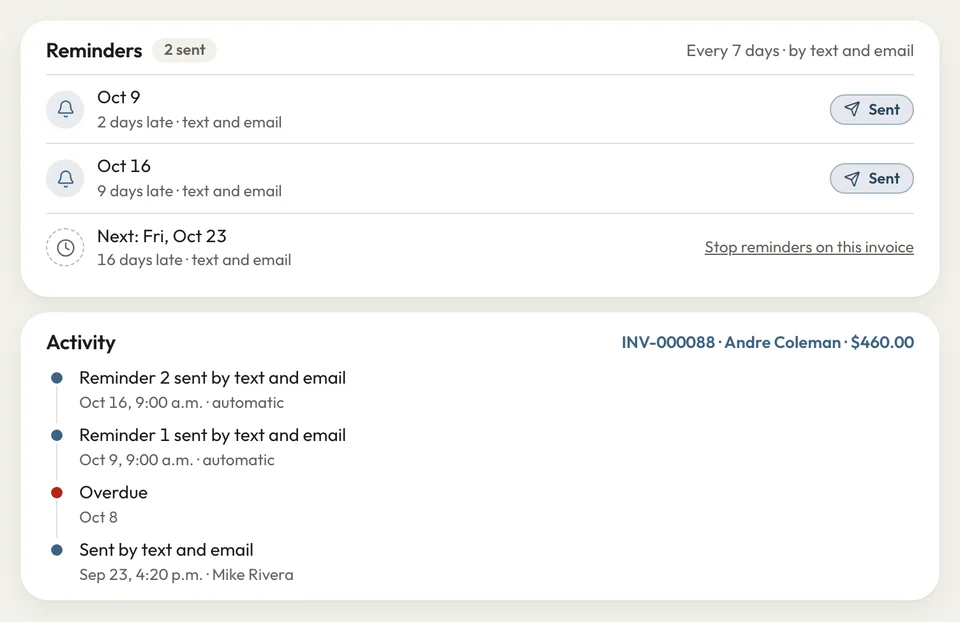
Reminders go out while you work
The panel swap passed inspection two weeks ago, and the customer says the check is coming. Meanwhile the wire for your next job goes on your own card.
On the due date the customer gets an email reminder, then another every 3 days, three times. Set a late fee once, and it's added when an invoice runs late. Money owed lists who's late and by how long.
- Email on the due date, then every 3 days overdue
- Late fee: set once, added to overdue invoices
- Money owed: who owes what, and since when
Job's done
The invoice draft is waiting at the office
The crew swapped the water heater and left, and you meant to make the invoice on the drive home. You remember in bed, two days later.
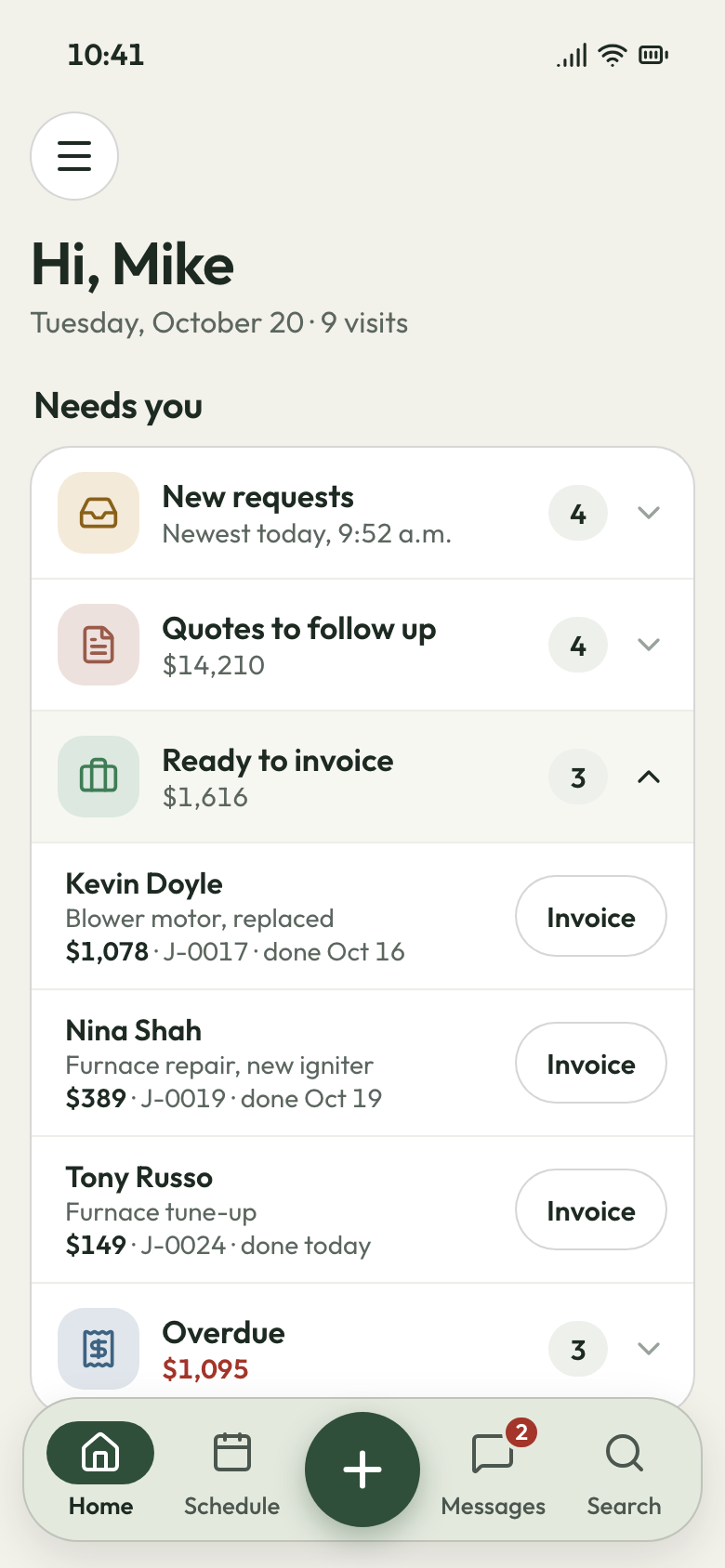
On a job billed after each visit, the tech's Complete tap drafts that visit's invoice. The parts the tech added on site are already on it. You check it at the office, then send it by text and email.
- Billed each visit: drafted when the crew taps complete
- Parts added on site carried onto the invoice
- Checked by you, then sent by text and email
Visit marked complete Month end
The whole month invoiced in one batch
Friday night, you scroll your texts to work out which of 60 lawn accounts owe for the month. Then you bill them one at a time.
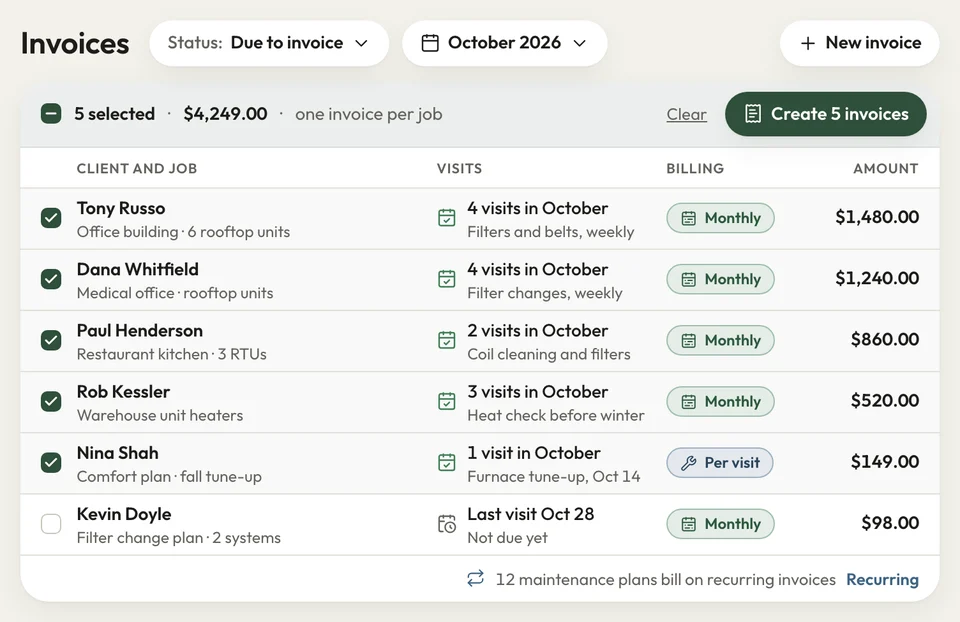
On the Invoices tab, tick every job that's due and invoice them together. Each monthly job gets one invoice for the month's visits, and maintenance plans can repeat on a recurring invoice. On a project, the final invoice takes off the deposit already paid.
- Tick the due jobs, invoice them in one batch
- Monthly: one invoice per job for the month's visits
- Recurring invoices: for maintenance plans
Due jobs, ticked to invoice


I hated calling people about money, so invoices sat unpaid for weeks. Now the reminders go out by email, and most pay from the link.
How it works
How a finished job becomes an invoice
Job done
Your crew marks the visit complete on their phone, with any parts they added.
Drafted
Jobs billed after each visit draft their invoice then. For any other job, press Create invoice.
Sent
You text and email it with the pay link, and the reminders follow if it runs late.
Related features
Where the invoice goes next
- See Payments
Payments
Customers pay by card from the link, or by bank in the US.
- See QuickBooks sync
QuickBooks sync
Sent invoices land in QuickBooks Online, with their payments and customers.
Customer portal
Customers log in under your name to see and pay what's open.
Next: Bring them backSee Customer portal
Questions about billing customers
Can I send a batch of invoices at once, or one monthly bill?
How do automatic payment reminders work?
Can I turn a finished job into an invoice without retyping it?
Can I take a deposit on a big job?
Do invoices sync to QuickBooks?

We do the setup
Let the reminders do the asking
We do the setup: your services and prices, your customers, each crew member's personal link to the crew app, and your website. Your late fee and payment terms go on before the first invoice.
- Free trial, no card
- Month to month, cancel any time