
Run the job
One rain day. The whole week slides.
JobsiteBooked's scheduling software for contractors moves a rained-out day in a few drags. Each customer whose visit moved is texted the new day, so you're not on the phone all night.
- Sold jobs with no date, listed beside the calendar
- Each tech's stops put in order on a map
- Repeat visits set once, then booked for months ahead
- Free trial, no card
- Month to month, cancel any time


Where it sits
Scheduling sits in Run the job
Land the job
Online booking · Estimates · Review requests · Marketing · Website
Run the job
Scheduling · Crew app · Job photos · Time tracking · Integrations
Bill the job
Invoicing · Payments · Expenses · QuickBooks sync · Reporting
Bring them back
Texting & inbox · Reminders · Customer portal · Customer list
Scheduling
Where the week comes apart
Rain, a job that runs long, and sold work with no date.
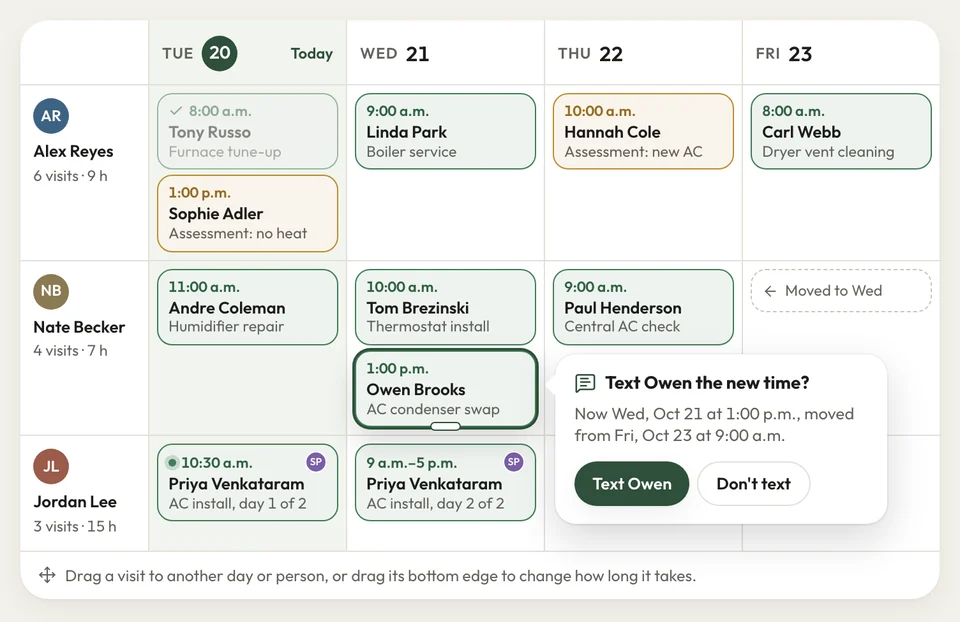
Rain day
Every customer hears the new day from you
It rains Tuesday and Wednesday. Thursday you're cramming two days of lawns into one, while customers text to ask if you're coming.
On the week view, drag each rained-out visit to its new day, or to another tech. Each customer whose visit moved gets a text and an email with the new day and time. Their reminder still comes the day before at 3:30 PM.
- Drag a visit to a new day or another tech
- Rescheduled: the customer gets the new day by text
- Reminders: the day before, then an hour before
Ran long
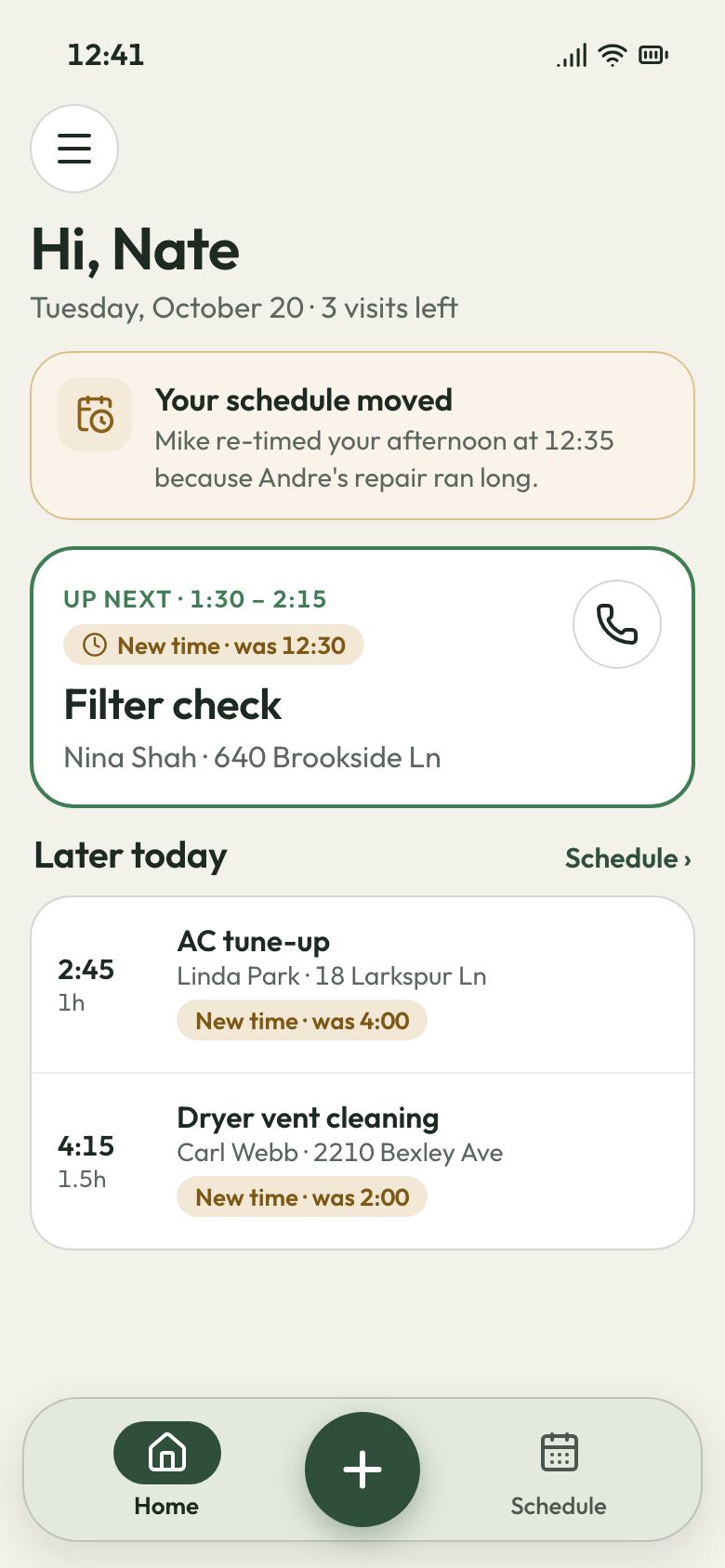
The day re-timed in one click
A troubleshoot booked for an hour takes half the day. The 2:00 customer waits at home, then calls you at 3.
Drag the 2:00 to tomorrow on the day view. The map then orders the tech's remaining stops by straight-line distance and re-times them back to back. Each customer whose time changed is texted the new one.
- Map: each tech's stops beside the schedule
- Apply order: later stops re-timed, customers told
- Arrival windows: one to four hours, not a set time
The day, re-timed Sold, no date
Sold jobs off the sticky notes
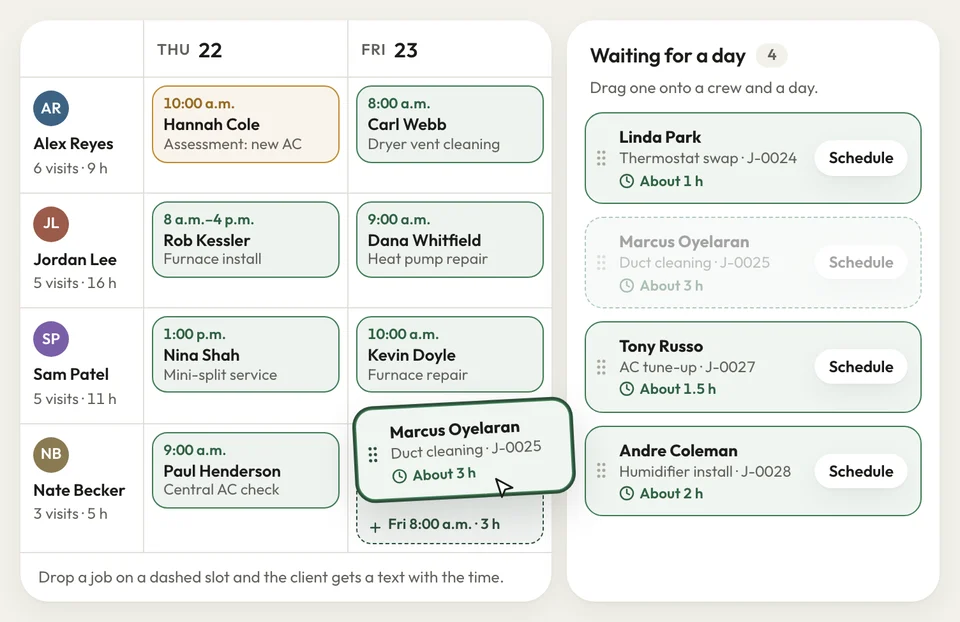
Four signed roofs have no install date yet. A homeowner calls to ask when, and you dig through texts for the answer.
Every job without a date waits in a schedule-later list beside the calendar. When a crew frees up, drag the next roof onto its day. Put a lead and up to three more crew on the same visit.
- Schedule later: sold jobs waiting for a day
- Crew per visit: a lead and up to three more
- Week view: a row for each tech
Waiting for a date


Rain used to mean a night on the phone, moving pours for three crews. Now I drag them to the next dry day, and every customer gets the new date by text.
How it works
Booked, staffed, moved when it rains
Put it on a day
Give a signed job its day and time, an arrival window, or any time that day.
Pick the crew
Choose the tech, add crew for the big days, and it's on each one's phone list.
Move it
Drag it when plans change. The customer is texted the new day.
Related features
What runs off the schedule
- See Crew app
Crew app
Each tech opens today, tomorrow or the week, with directions to every stop.
- See Time tracking
Time tracking
Your crew clocks in and out of each visit on the crew page.
Invoicing
With per-visit billing, a completed visit drafts its invoice for you to send.
Next: Bill the jobSee Invoicing
Questions about the schedule
Can I set up jobs that repeat?
Can I put more than one crew member on a job?
Can my crew see their schedule on their phone?
Does it put my stops in the best order?
Where do sold jobs go that don't have a date yet?

We do the setup
The next rain day takes a few drags
We do the setup: your services and prices, your customers, each crew member's personal link to the crew app, and your website. Then next week goes on the calendar.
- Free trial, no card
- Month to month, cancel any time