
Land the job
Slammed all summer. Quiet all winter.
JobsiteBooked does email marketing for contractors: your slow-season offer goes to every past customer as an email or text. Spring work gets signed, with deposits paid, before the season starts.
- Past customers loaded by us, ready for the first send
- One email or text to everyone, or only a tagged group
- Every new request shows how they heard about you
- Free trial, no card
- Month to month, cancel any time


Where it sits
Marketing sits in Land the job
Land the job
Online booking · Estimates · Review requests · Marketing · Website
Run the job
Scheduling · Crew app · Job photos · Time tracking · Integrations
Bill the job
Invoicing · Payments · Expenses · QuickBooks sync · Reporting
Bring them back
Texting & inbox · Reminders · Customer portal · Customer list
Marketing
Your past customers are the slow-season work
Three places the off season costs you, and what to send.
January
Spring work signed before the ground thaws
No pours from December to March, and the mortgage still wants a check every month. Last year's customers are names in your phone, and none of them hear from you.
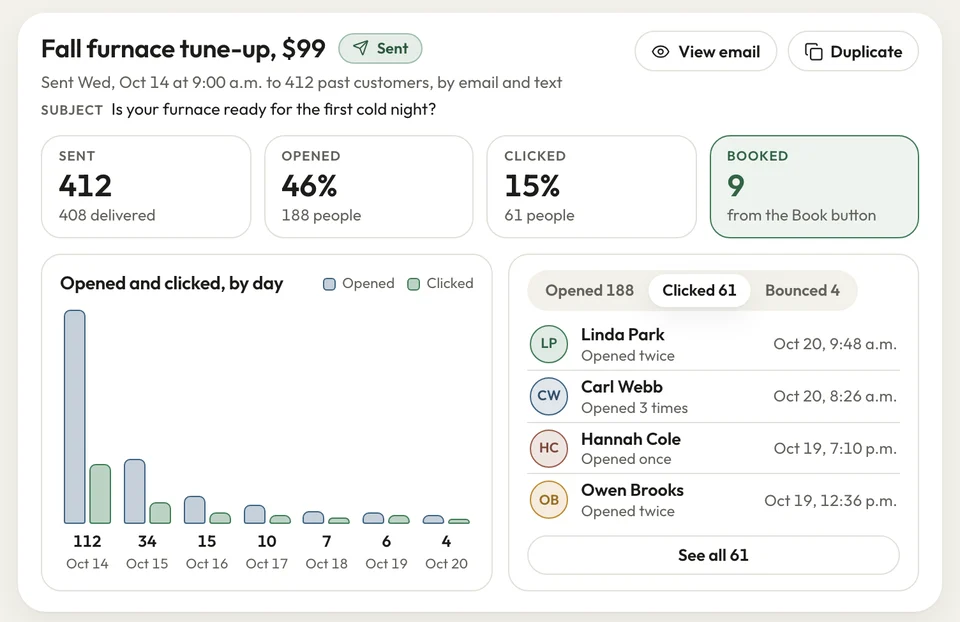
We load your old customer list at setup. In January, you email them a spring repair or sealing offer from the built-in email builder. Whoever replies gets an estimate; they sign it, then pay the deposit by card.
- Email campaigns: written in the built-in builder
- Your list: every past customer, loaded at setup
- Deposits: paid by card right after the spring job is signed
The text
Text the whole list, answer from your phone
In October you email a winter interior offer, and it sits unread under a dozen store coupons. Meanwhile your painters are asking for hours.
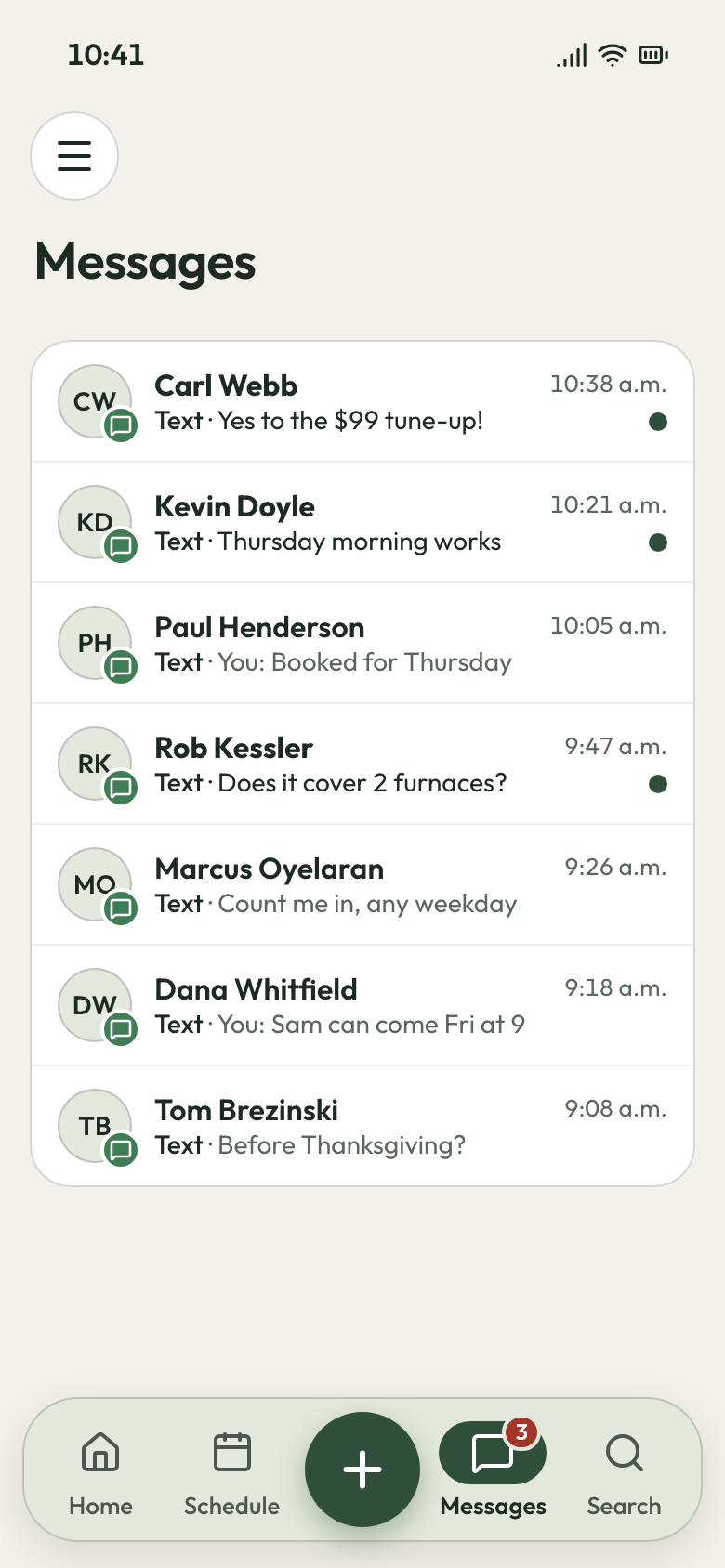
Send the same offer as one short text to every past customer who agreed to texts. Each reply comes back as a normal text thread, and you answer each one from the truck at lunch.
- Bulk text: your offer as one short text
- Replies answered from the inbox on your phone
- Tags: send only to last year's exterior customers
Replies to your text Ad money
See which ads bring in requests
You paid for yard signs, a Facebook ad and a lead app this spring. By fall you can't say which one brought the work.
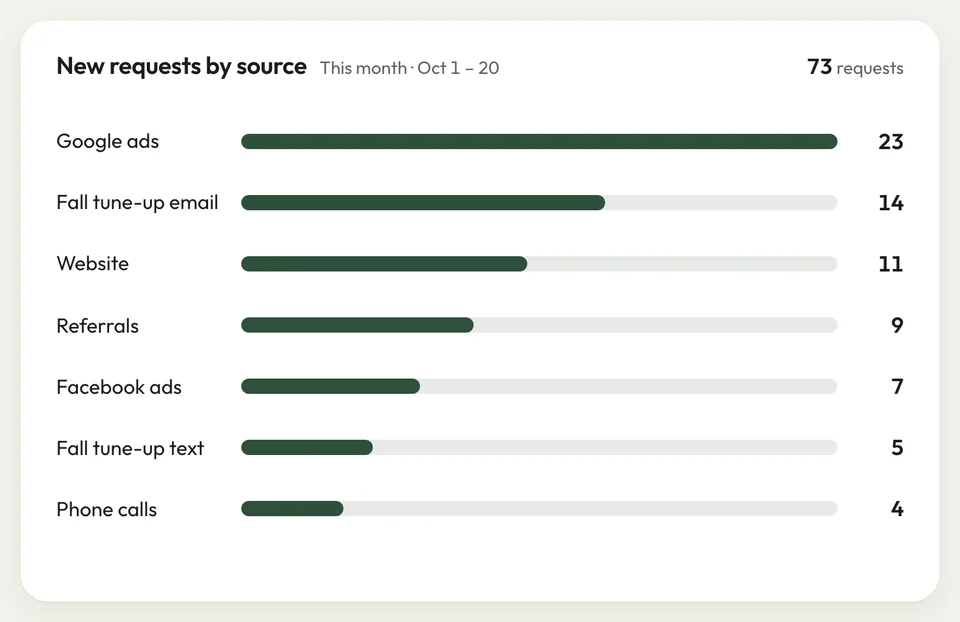
The request form asks every new customer how they heard about you. Your Home screen counts requests by source, so next season's money goes where the requests came from.
- Lead source: on every request, from the form
- Home: requests counted by source
Lead sources on Home


February used to mean nothing on the calendar. I texted last year's customers a spring cleanup offer, and April was full before the snow melted.
How it works
Three steps to a fuller winter
Write it
Write the offer in the email builder, or keep it to a short text.
Pick who
Send to every past customer, or only a tag like last fall's deck jobs.
Send it
Pick the day it goes out. Replies come back to your inbox.
Related features
What works with your campaigns
- See Review requests
Review requests
Every closed job sends your Google review link: email first, then a text.
- See Website
Website
Put your booking link in the offer; it opens the website we build.
Integrations
Zapier, Google Calendar, and two-way email through Gmail or Outlook.
Next: Run the jobSee Integrations
Before your first campaign
Can I send an email campaign to all my past customers?
Can I send a bulk text to my customer list?
Is email marketing a separate app I have to connect?
Can I see which lead source my jobs came from?
How do I fill the schedule in the slow season?

We do the setup
Book next spring this winter
We do the setup: your services and prices, your customers, each crew member's personal link to the crew app, and your website. Your first offer goes to people who already know your work.
- Free trial, no card
- Month to month, cancel any time