
JobsiteBooked for fence and deck builders
You measured it. Someone else built it.
JobsiteBooked is job software for fence contractors and deck builders: the quote goes out the night you measure. Start from your last fence, and the customer picks pressure-treated, cedar or vinyl, then signs on their phone.
- Free trial, no card
- We do the setup
- Month to month

- Measure booked 6:50 AM Three yard photos sent, Thu 4 PM
- Cedar privacy fence signed 7:20 AM 180 ft, deposit paid by card
- Follow-up text sent 7:45 AM Deck quote from Monday, not signed yet
Features for fence and deck builders
Tools for the yards you measure and build
Each tab follows a privacy fence, a reboard or a new deck.
Land the job
Estimates
Customers get three quotes just to compare materials. Yours holds PT, cedar and vinyl, with the gate as an add-on.
- Three options: PT, cedar and vinyl side by side
- Viewed: shows the day they opened it
- Saved templates: your styles, privacy to shadowbox

Land the job
Online booking
An hour's drive to a yard that was never a real job. The request form asks for photos of the yard and the old fence first.
- Yard photos: the slope, the old fence and the gate spot
- Measure visits: booked into an open slot on your calendar
- Confirmation: a text when they book, and a reminder before

Land the job
Review requests
Customers look up your Google reviews before they call. Every job you close asks for one the next day.
- An email with your Google review link, a day after close
- Then a text, three days on
- Gate repairs and reboards ask too, not only new builds

Land the job
Marketing
Decks stop when the ground freezes. In January, send every past customer a restain or spring-build offer by email and text.
- Email campaign: a restain offer to past deck customers
- Bulk text: one message to everyone you've quoted or built for
- Lead sources: door hangers, Facebook or Google, per request

Land the job
Website
A fence company with no website looks like a side job. We build your website, with online booking on it, as part of setup.
- Request form: yard photos and good times, from your site
- AI front desk: answers the site's chat while you set posts
- Fences, decks, gates and repairs listed as your services
Run the job
Scheduling
April, and half your signed fences wait on permits, HOA or locates. Each one sits in the schedule-later list until it clears.
- Schedule later: every signed build waiting on approval
- Rain day: drag the install to Thursday, and the customer gets the new time
- Map: the day's measure visits, nearest first

Run the job
Crew app
Crews call you to ask where the gate goes. The job's notes say so, and the checklist covers the rest.
- Checklist: locates marked, pins found, permit posted
- On my way: the customer gets the ETA by text
- Extra boards: added as lines on site, so they reach the invoice

Run the job
Job photos
Rot under the old boards that the customer never saw. The crew photographs it on the visit, and you circle it in the office.
- Before, during, after: tagged to each build day
- No bars out back: the Android app sends them once there's signal
- Photo report: a PDF or a link the customer can open

Run the job
Time tracking
A two-day fence took four. The crew's clocked visits and a visit note say why: rock in every post hole.
- Per visit: each builder clocks in and out on the crew page
- Labor cost: clocked hours count against the job's profit
- Timesheets: approve the week, then download the hours as a CSV

Run the job
Integrations
Measures in a paper planner, builds on the shop whiteboard. Both land in your Google Calendar, synced both ways, and builders open their day in the crew app.
- Google Calendar: two-way for the owner and the office
- Gmail or Outlook: customer emails reach your inbox
- Zapier: connects the other tools you use
Bill the job
Invoicing
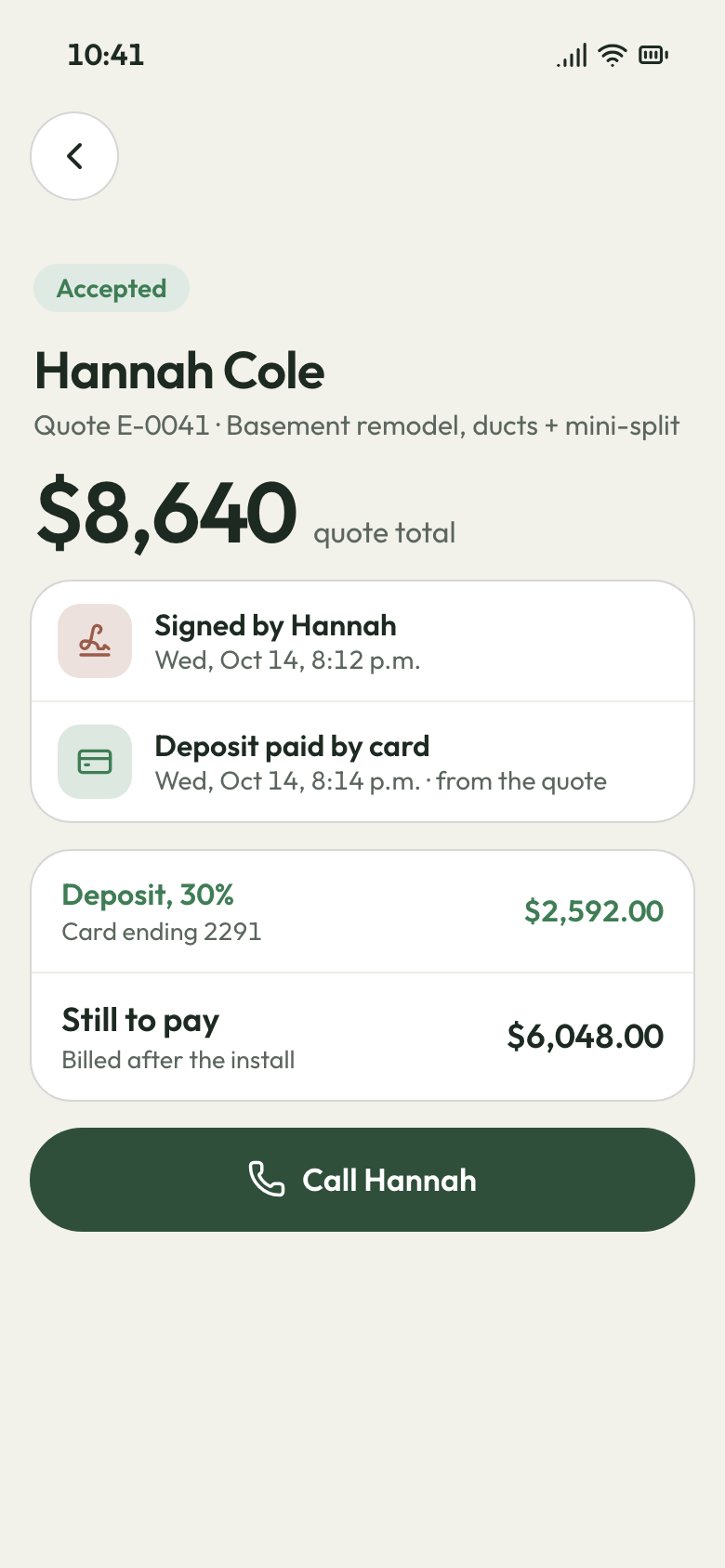
A five-figure fence and one invoice at the very end. Take a deposit once they sign, and the final invoice bills only the rest.
- Deposit: set as a percent or a flat amount
- Final invoice: the total less the deposit they paid
- Late fee: added when the final slips past its terms

Bill the job
Payments
A week waiting for the final check to come in the mail. Customers pay by card from a text, or straight from the bank in the US.
- Deposit by card: paid right after they sign, before you buy lumber
- Text-to-pay: a card link on every invoice
- Bank payments: for US customers, on any invoice

Bill the job
Expenses
The lumber yard, the concrete, the dump run for the old deck. Enter each receipt on its job at the office computer.
- Receipt photo: kept on the job it paid for
- Tear-out: the dump fee counted against that job
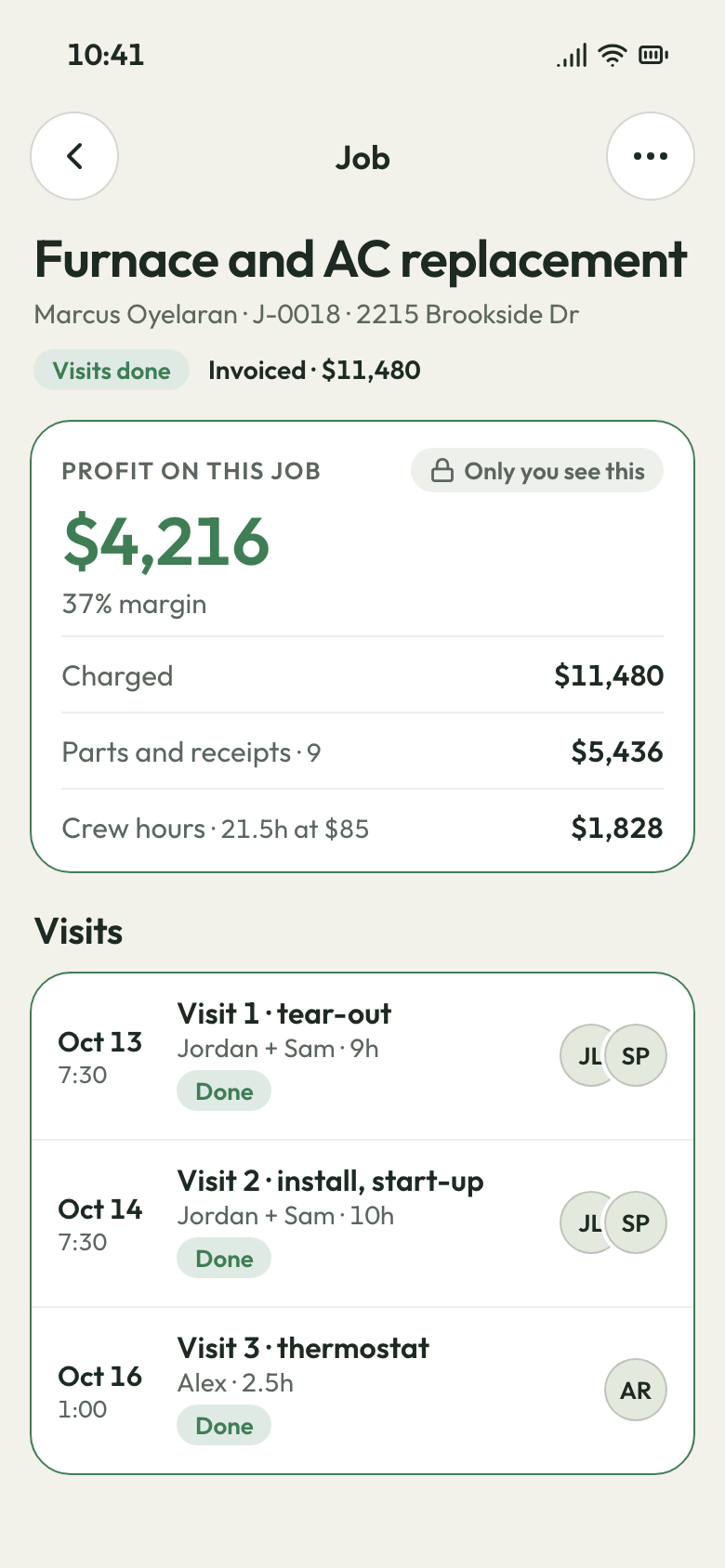
- Job profit: materials set against what you billed

Bill the job
QuickBooks sync
Sunday nights retyping deposits and finals into QuickBooks. Each invoice and payment syncs over to QuickBooks Online.
- What goes over: sent invoices, payments and customers
- Your accountant works from the same numbers
- Connected while we do your setup
Bill the job
Reporting
A full spring, and you can't say which builds made money. Job profit shows each one, and Money owed shows every late final.
- Money owed: every open balance and how old it is
- Per job: lumber, crew hours and receipts against the price
- Sales tax: the total at each rate

Bring them back
Texting & inbox
Customers text a photo of the neighbor's fence, or message you on Facebook. Each thread lands in one inbox you answer from your phone.
- Business line: calls to the shop ring the Android app
- Missed call: Call back or Request in a tap, or text them first
- AI front desk: takes calls, chat, email and Facebook while you dig

Bring them back
Reminders
The crew pulls up and the dog is loose in the yard. A text goes out the afternoon before and again an hour ahead.
- Day before: 3:30 PM, and again an hour out
- On my way: the ETA, so the gate's open and the dog's in
- Quote follow-ups: day 2 by text, day 5 by text and email

Bring them back
Customer portal
Signed in March, and calling every week to ask when. Customers log in to see the install date, shared files and invoices.
- Visit dates and shared files, like the drawing and the permit
- Invoices paid by card, and new work requested from their login
Bring them back
Customer list
A customer from two summers ago wants the deck restained. Their record holds the boards, the stain and last year's gate fix.
- History: every job and visit at that address
- Pinned note: the dog, the side gate, the HOA's color rules
- Tags: mark each deck that's due a restain

The quote, the build, the lumber bill
Three ways a fence or deck loses money
The quote night, the soft joist and the lumber price, each with its fix.
9 PM, after the measure
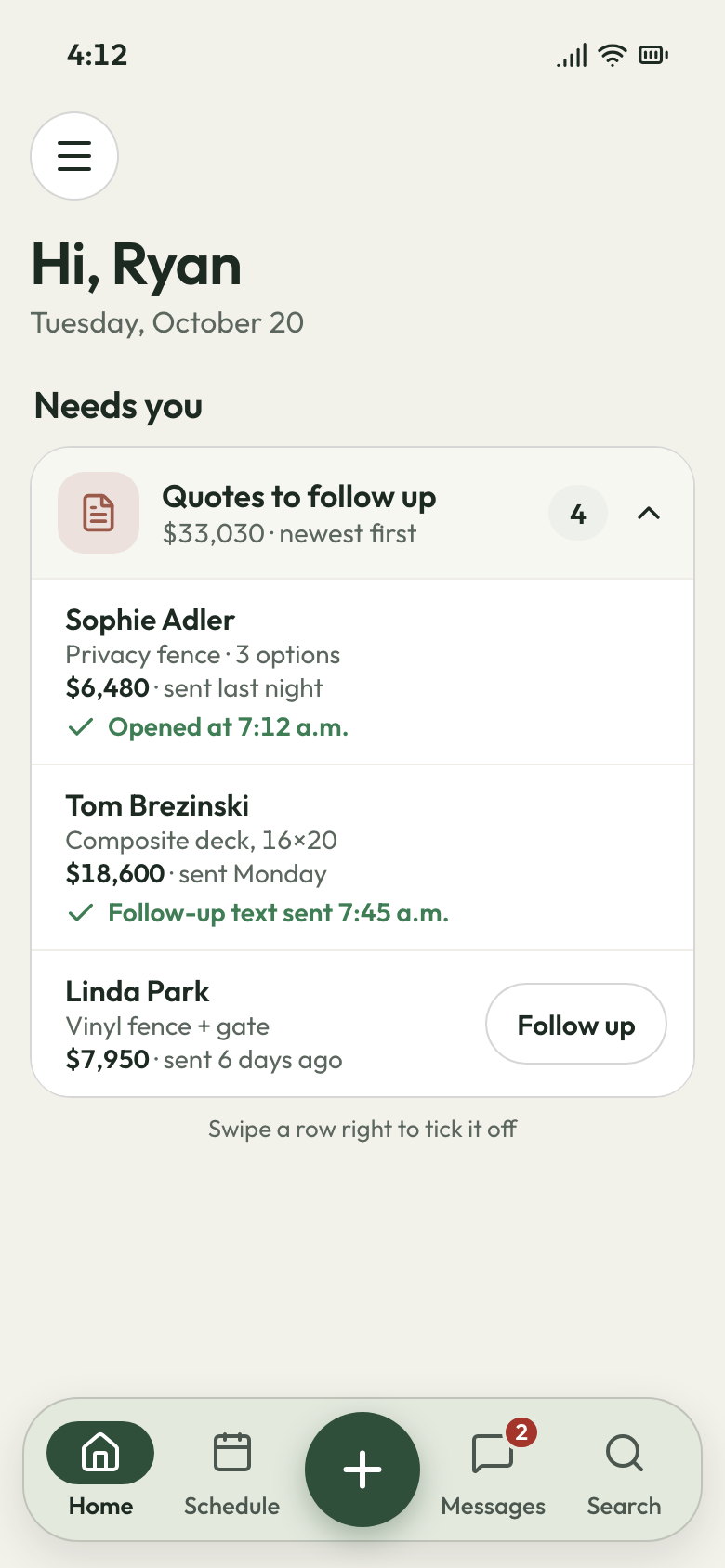
Your quote lands first, with three options
You measured at 5, counted every post and picket, and typed the quote at 9. By Saturday the customer had signed with whoever gave a price at the kitchen table.
Copy last month's 150 ft privacy fence and change the footage. Pressure-treated, cedar and vinyl go in as three options, with the gate and tear-out as add-ons. The quote is marked Viewed once they open it. A follow-up text goes at 2 days, and a text and email at 5. They sign on their phone and pay the deposit by card. Or they sign in person on your tablet.
- Copy an estimate: last month's fence, this yard's footage
- Options and add-ons: PT, cedar or vinyl, plus the gate
- Two follow-ups: a text on day 2, then text and email on day 5
Boards off, rot found
The extra work, signed before you fix it
The old boards come up, two joists are soft and the ledger was never flashed. The customer says go ahead, then pays the contract price and not a cent of the repair.
The crew photographs the rot on the visit, and you circle it on the photo. You build the repair as its own estimate at your desk, with those photos in it. The customer signs on their phone before anyone cuts a board. Every text and email sits on their customer record, so the go-ahead is in writing.
- Draw on a photo: a red circle round the soft joist
- Repair estimate: its own price, signed on their phone
- Inbox: the go-ahead kept on their record
Lumber went up
Old prices expire, and your margin holds
First fence of the spring, and posts and pickets cost more than last fall. Last fall's quotes are underwater, and a customer who cancels after delivery wants the whole deposit back.
Every estimate carries an expiry date, so an old price isn't owed forever. Renew one in a click. You see cost and markup on every line, and your crew never does. A customer who balks at cedar can step down to PT on the same quote. Your cancellation and restocking terms sit on every estimate they sign.
- Expiry: old prices run out, renewed in one click
- Owner-only cost: markup your crew never sees
- Your terms: cancellation and restocking, signed with the quote


Sign April's fences in February
Send every past customer a winter offer by email and text, and book spring installs before the thaw. Month to month, cancel any time.
What contractors say

Luis M.HVAC service Every seasontune-ups rebookedTune-up customers get put back on the schedule every season, and I don't lift a finger.

Carlos S.General contractor 40 → 150Google reviews in a yearWe went from 40 Google reviews to over 150 in a year, and nobody had to ask a customer by hand.

Mike D.Remodeling contractor Halfsigned before I'm homeI used to write estimates at the kitchen table at night. Now I send them from the truck, and half get signed before I'm home.

Dave P.Handyman Zeromissed callers left waitingIf my phone rings while I'm on a ladder, the caller gets a text from my business number before I climb down. Half the time they've picked a slot by then.

Tom R.Painting company 7 a.m.calls stoppedMy crew opens their phone and sees the whole day: addresses, notes, what to load. The 7 a.m. calls stopped.

Jake K.Flooring installer From a textinvoices paidCustomers pay the invoice from a text before we've finished loading the truck.


Why fence and deck builders switch
What a small fence crew stops paying for
The drive to measure a no-go
The request form shows you the yard and the old fence in photos before you leave.
The trip back for a sticking gate
The crew ticks the checklist (gate swings, latch catches) and the customer signs off on the crew's phone.
The final that shows up a month late
The deposit comes in once they sign, and the final goes by text with a card link.
What fence and deck builders ask first
Is there an app for sending fence quotes?
Should I give a price per foot over the phone before I measure?
Should I charge for deck estimates?
What can I do when a customer won't pay the final on a fence?
What's the best fence contractor software for a small shop?
Does it work with QuickBooks, and is there an app for my fence crew?
We do the setup
Set posts all April. We load the prices.
We do the setup: your services and prices, your customers, each crew member's personal link to the crew app, and your website. You keep building.
- Free trial, no card
- Month to month, cancel any time