
Bring them back
The landlord questions the bill. Pull up the visit.
JobsiteBooked is a CRM for contractors: each customer's record holds their properties, jobs, visits and photos. When a landlord questions the bill, open that rental: the clock-in times and before and after photos are there.
- Every rental under one customer, each with its own history
- A pinned note on top: gate code, dog, pays net 30
- Tags and lead source on every customer
- Free trial, no card
- Month to month, cancel any time


Where it sits
Customer list sits in Bring them back
Land the job
Online booking · Estimates · Review requests · Marketing · Website
Run the job
Scheduling · Crew app · Job photos · Time tracking · Integrations
Bill the job
Invoicing · Payments · Expenses · QuickBooks sync · Reporting
Bring them back
Texting & inbox · Reminders · Customer portal · Customer list
Customer list
When the history lives in your head
Three times you need a customer's past, and where it is now.
Disputed bill
Each rental has its own history
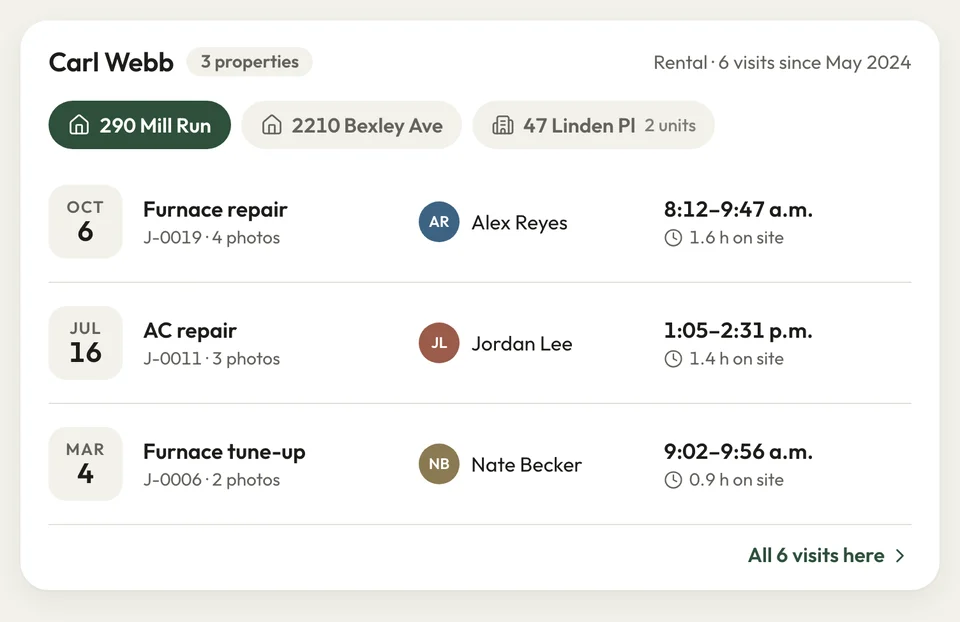
Three turnovers for one property manager this month, each at a different address. The invoice sits 45 days, then they say you weren't there the whole time.
The manager is one customer, and each rental is its own property. Open a rental to see its visits, with clock-in and clock-out times and before and after photos. That settles the hours question without a discount.
- Many properties: one customer, every address
- Property history: visits, photos and signatures
- Time entries: each visit's clock-in and clock-out
Customer record The callback
The crew sees what was done there
A year after the install, the customer calls: the boards are cupping. Nobody remembers which product went down, and the manufacturer blames the install.
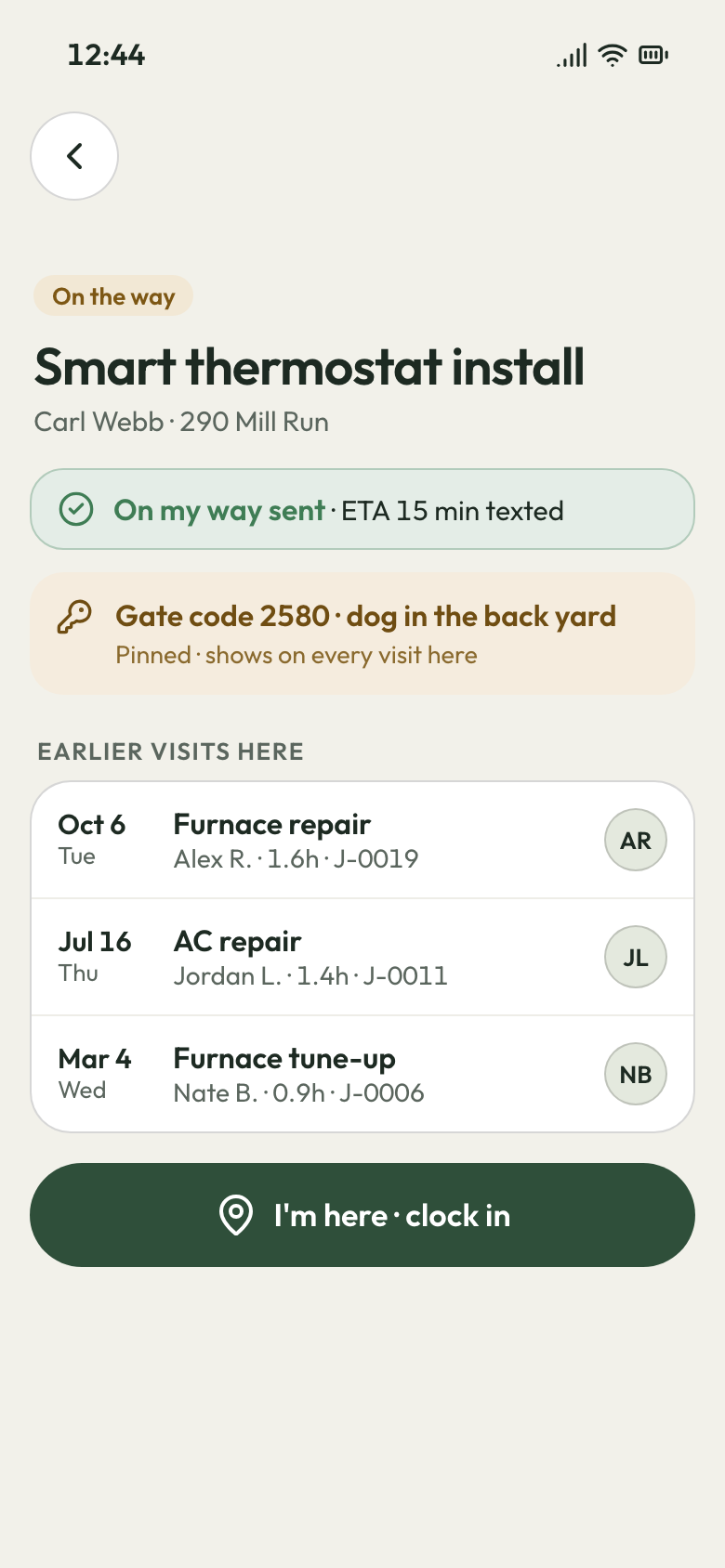
The tech's phone shows the property's history on the visit, with every past visit and the gate code. In the office, the old job still lists the product on its lines, with photos of the bare subfloor.
- Property history: past visits on the crew's phone
- Gate codes: saved on the property, shown at the visit
Property history Who's calling
The one thing to know, pinned on top
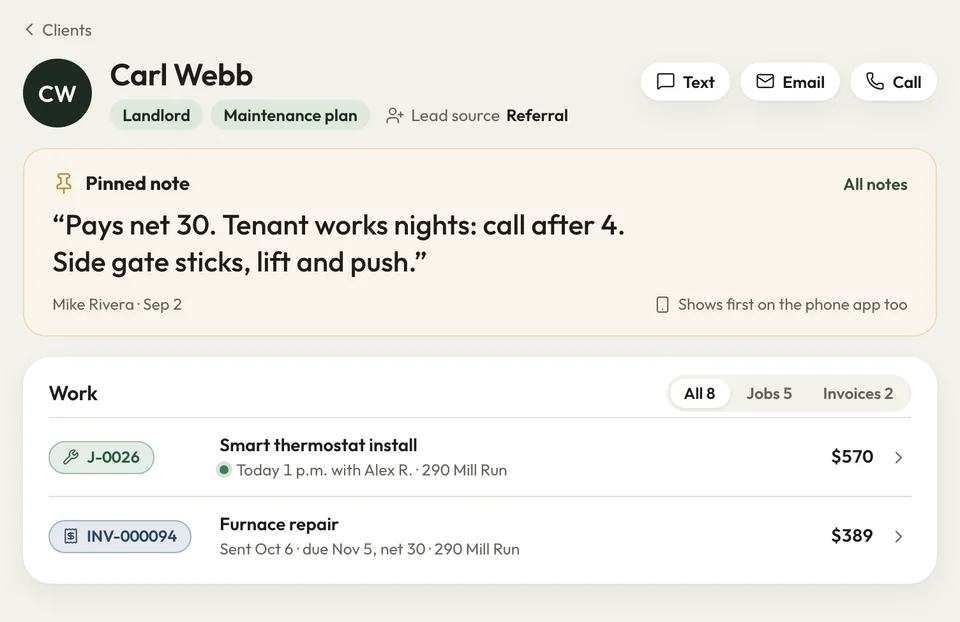
The landlord pays net 30, the tenant works nights, and the side gate sticks. It all lives in your head, so anyone answering the phone has to ask you.
Write it in the customer's pinned note, and it shows first on the phone app and the office computer. Tags sort customers your way: landlord, maintenance plan, spring deck. Each customer also carries the lead source that brought them in.
- Pinned note: first thing on the customer, phone and desktop
- Tags and lead source: on every customer


A landlord swore the retaining wall we built two years back was leaning. I opened that job on my phone, and the photos settled it on the spot.
How it works
How a customer's history builds up
We load it
Send us your spreadsheet: we bring in your customers, their properties and past jobs.
Look it up
Search a customer on the phone app and open the address you're headed to.
Tag it
Pin the note that matters and add a tag, like warranty or net 30.
Related features
Built on the customer record
Questions about your customer list
What does a CRM do for a home service company?
What does it keep on each customer?
Can one customer have more than one property?
Can my crew see what we did last time at an address?
Can I tag customers and pin a note to the top?

We do the setup
Bring your spreadsheet. We load the list.
We do the setup: your services and prices, your customers, each crew member's personal link to the crew app, and your website. Properties and past jobs come in with your customers.
- Free trial, no card
- Month to month, cancel any time